Define policy
Default behavior. A fresh default setup uses AllPolicies with no policies, so everything is permitted until you explicitly configure spending limits. If you switch to a specific PolicySet with no policies attached, every request is denied.
Define what should go through automatically. Manual approval is a separate step covered in Manual approval. Policy is evaluated locally before signing - WLFI is not involved in any transfer of funds.
What most users need
For a first setup, base policy means:
Pick the token you care about
Confirm its network mapping
Set
per-tx,daily, andweeklylimitsSave and apply
That is enough. Skip destination overrides, gas caps, and manual approval rules until later.
Fastest path: use the TUI
agentpay admin tuiThe TUI keeps everything visible: saved networks, saved tokens, current draft, and a clear apply step.
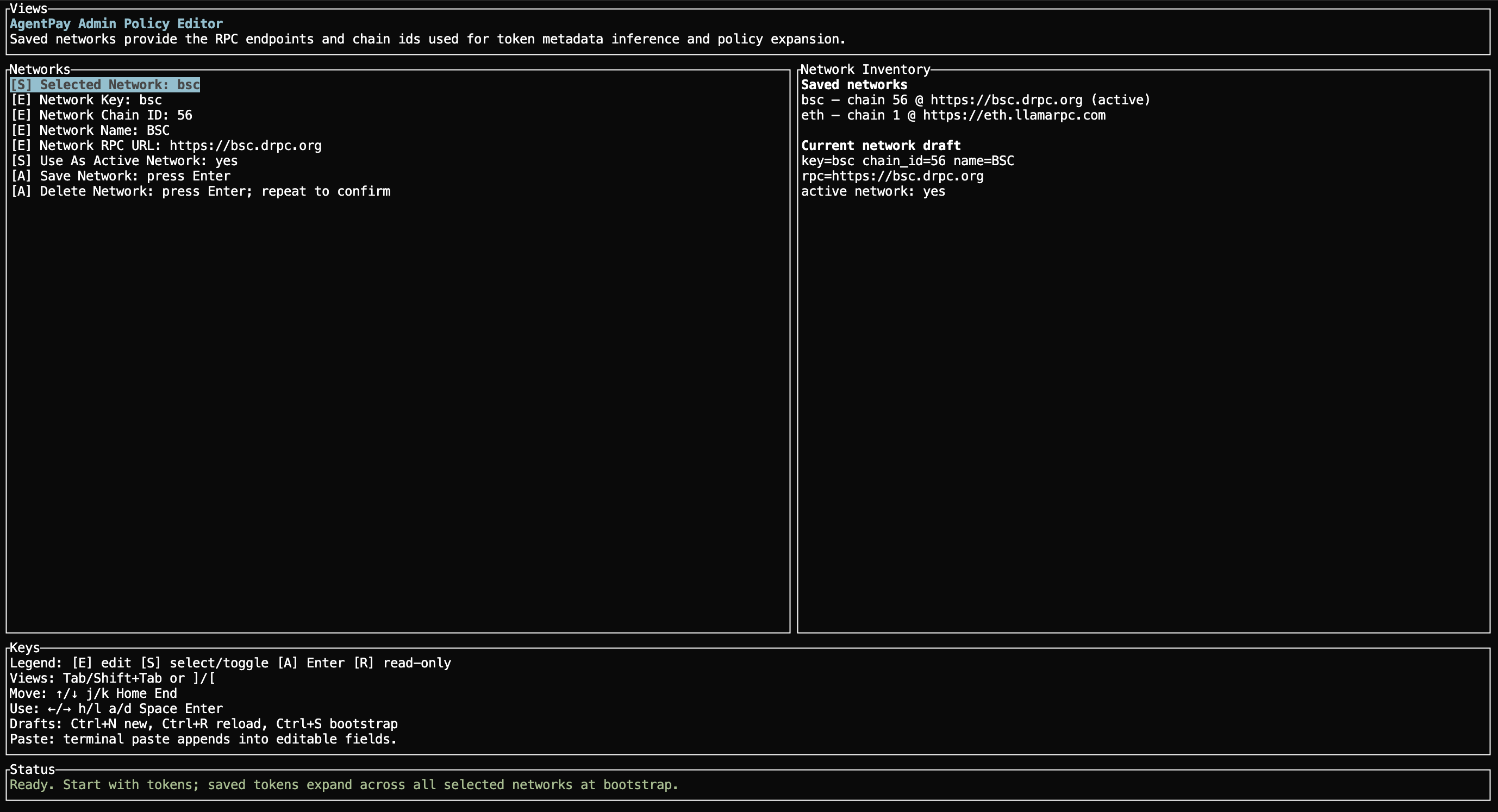
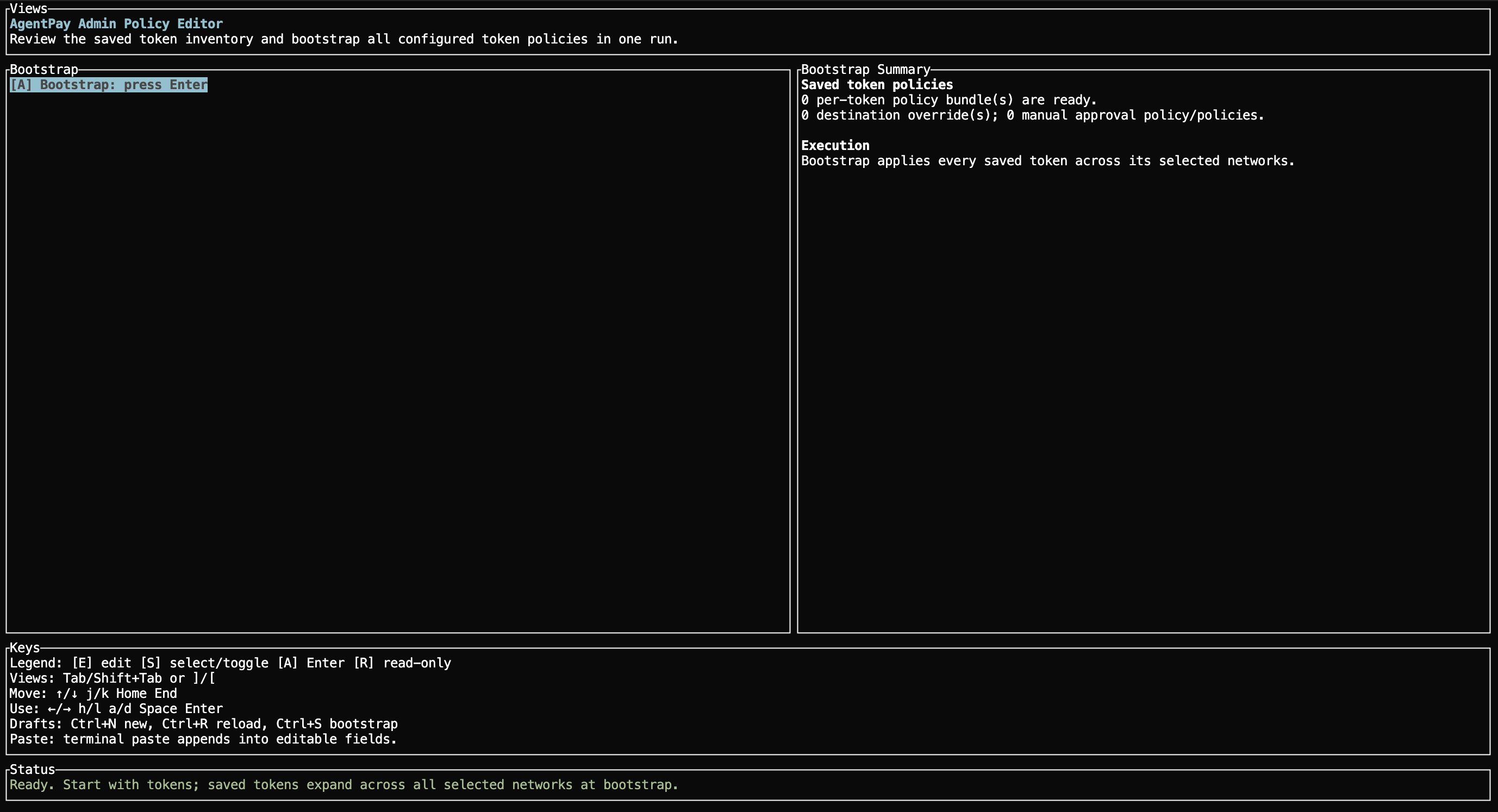
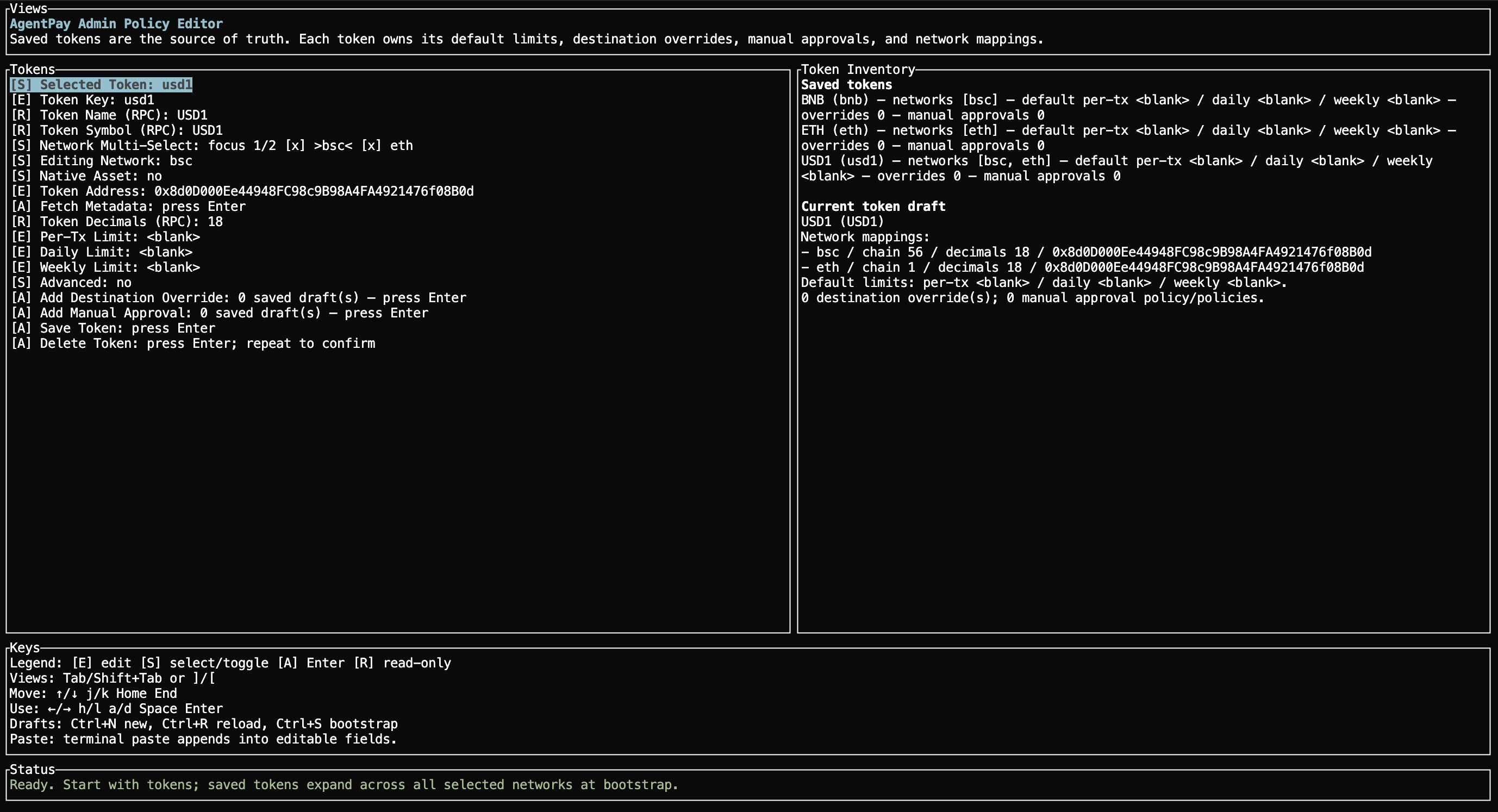
The three TUI views
Tokens: set token mappings and spending limits (this is where you spend most time)Networks: confirm or save chain key, chain ID, RPC URL, and active networkBootstrap: apply the saved token inventory to the wallet


Minimal TUI walkthrough
Use this order for the normal base-policy path:
Open
agentpay admin tui.If you need a new network or different RPC, go to
Networks, fill inNetwork Key,Network Chain ID,Network Name, andNetwork RPC URL, then save it.Go back to
Tokens.Select the token you want to configure, or create a new draft.
In
Network Multi-Select, toggle each network you want withSpace. Use←/→to move between saved networks.In
Editing Network, pick the specific network mapping you want to edit.Mark
Native Assetfor native gas assets, or enterToken Addressfor an ERC-20.Use
Fetch Metadataafter the network RPC is saved so the editor can populate token name, symbol, and decimals.Fill in
Per-Tx Limit,Daily Limit, andWeekly Limit.Save the token.
Go to
Bootstrapand apply the saved inventory.
That is the normal path.
For the built-in BSC reference profiles:
bnbis recognized as the native gas asset onbsc(available as a TUI reference profile, but not pre-seeded into your config)usd1is pre-seeded onethandbscwith no spending limitsbscis already seeded as a saved network
Useful TUI keys
You do not need every key at once. These are the ones that matter for normal use:
Tab/Shift+Tabor[/]: move betweenTokens,Networks, andBootstrapUp/Downorj/k: move between fieldsLeft/Rightorh/l: cycle a selectable fieldSpace: toggle booleans and network membership selectionsEnter: run the action on the selected fieldCtrl+S: bootstrap and apply the saved inventoryCtrl+N: start a new token or network draftCtrl+R: reload saved data and discard the current dirty draftCtrl+O: add a destination override (Tokens view)Ctrl+M: add a manual approval rule (Tokens view)q/Esc/Ctrl+C: quitHome/End: jump to the first or last field
Ctrl+S works from any view, not only from Bootstrap. When a token or network draft is dirty, Ctrl+S persists the draft and reapplies wallet policies in one step. There is no separate "save only" step for dirty drafts in the TUI.
Two action rules are worth remembering:
Save Tokensaves the current token draftBootstrapapplies the saved token inventory to the wallet
If the saved view and the current draft do not match, the draft is not saved yet.
Direct CLI examples
If you already know the exact values you want, you can define the same base policy directly.
Default BSC native asset policy:
Default BSC USD1 policy:
These examples use token units for --per-tx, --daily, and --weekly.
What to skip for now
Most users can ignore these on the first pass:
destination-specific overrides
advanced gas, fee, tx-count, or calldata caps
manual approval rules
Add those only after the base policy is working.
Destination overrides can only tighten. A destination override can reduce the per-tx, daily, or weekly limit for a specific recipient, but it cannot raise the limit above the matching token policy. This is a security invariant enforced by the policy engine.
Policy evaluation model
This section is reference material. You do not need it to set up a working policy.
All policies must pass
Every applicable policy must pass independently. If any one denies a request, the request is denied.
Scope filters
Each policy carries three scope filters - Assets, Recipients, Networks - each set to All or a specific set of IDs. A policy only applies when all three match the request. Requests outside every policy's scope hit NoApplicablePolicies and are denied.
Policy attachment
Each agent key sees either AllPolicies (every enabled policy, including future ones) or a named PolicySet (explicit list of policy IDs), controlled by policyAttachment in the wallet profile.
Calldata decoding
For broadcast requests containing ERC-20 transfer, approve, Permit2 permit, or EIP-3009 transferWithAuthorization / receiveWithAuthorization calldata, the engine decodes the inner recipient and amount and applies per-transaction spending limits. Requests with both ERC-20 calldata and a native value are rejected.
Additional policy types
Beyond the three base spending limits (PerTxMaxSpending, DailyMaxSpending, WeeklyMaxSpending) and ManualApproval, the SDK policy engine also supports:
DailyMaxTxCount- daily transaction count limitPerTxMaxFeePerGas- gas price ceiling per transactionPerTxMaxPriorityFeePerGas- priority fee ceiling per transactionPerTxMaxCalldataBytes- calldata size limit per transactionPerChainMaxGasSpend- per-chain gas budget
These can be configured through the TUI or via agentpay admin setup flags such as --daily-max-tx-count, --per-tx-max-fee-per-gas-wei, --per-tx-max-priority-fee-per-gas-wei, --per-tx-max-calldata-bytes, and --max-gas-per-chain-wei.
Shared config vs live wallet state
The agentpay admin token set-chain, agentpay admin chain add, and similar editors update the local shared config in ~/.agentpay/config.json. They do not change the live daemon wallet by themselves.
agentpay config show --json prints that local shared config snapshot. Treat it as a saved source-of-truth draft, not as proof that the current daemon policy attachment already changed.
To apply shared-config edits to the live wallet, use agentpay admin tui and save the draft there, or rerun agentpay admin setup --reuse-existing-wallet.
To inspect the concrete contents behind wallet attachedPolicyIds, read the IDs from agentpay config show --json, then query the daemon directly with agentpay admin list-policies --policy-id <UUID>.
Spend window accounting
Spend window policies are signing-budget controls, not post-settlement accounting. A request counts against daily/weekly usage once the daemon successfully approves and signs it, including completed manual approvals, even if the signed transaction is broadcast later or ultimately fails on-chain.
Policy rejection messages
When a request is denied, the CLI prints a message from the policy engine. Common examples:
no enabled policies attached to this agent key
No policies are attached to this wallet profile
Attach policies via TUI Bootstrap or --attach-bootstrap-policies during setup
no policy scope allows recipient/asset/network for this action
Policies exist but none match the request's asset + recipient + network
Add a policy whose scope covers the requested asset, recipient, and chain
policy <id> rejected request: per transaction max <limit> < requested <amount>
The request exceeds the per-transaction spending limit
Raise Per-Tx Limit for that token or reduce the transfer amount
policy <id> rejected request: window usage <used> + requested <amount> > max <limit>
The request would exceed the daily or weekly spending window
Wait for the window to reset or raise the daily/weekly limit
policy <id> rejected request: gas max <limit> < requested <gas>
Gas budget exceeded
Raise PerChainMaxGasSpend or reduce gas usage
policy <id> rejected request: tx_count usage <used> + 1 > max <count>
Daily transaction count limit reached
Wait for the daily window to reset or raise DailyMaxTxCount
policy <id> rejected request: max_fee_per_gas_wei <limit> < requested <requested>
Max fee per gas limit exceeded
Raise PerTxMaxFeePerGas or lower the gas price
policy <id> rejected request: max_priority_fee_per_gas_wei <limit> < requested <requested>
Priority fee limit exceeded
Raise PerTxMaxPriorityFeePerGas or lower the priority fee
policy <id> rejected request: calldata max bytes <limit> < requested <requested>
Calldata size limit exceeded
Raise PerTxMaxCalldataBytes or reduce calldata
policy <id> rejected request: missing required transaction metadata (<metadata>)
Required tx metadata missing
Ensure the transaction includes the required metadata fields
policy <id> rejected request: amount max <limit> < requested <amount>
Transfer exceeds a manual approval rule's maximum - hard-denied without entering the approval flow
Reduce the transfer amount or raise Approval Max Amount in the manual approval rule
policy <id> requires manual approval for requested amount <amount> within range <min>..=<max>
The request matched a manual approval rule
Approve or reject via CLI
When you are ready to introduce a human approval step, continue to Manual approval.
Last updated