> For the complete documentation index, see [llms.txt](https://docs.worldlibertyfinancial.com/llms.txt). Markdown versions of documentation pages are available by appending `.md` to page URLs; this page is available as [Markdown](https://docs.worldlibertyfinancial.com/wlfi-token/trade-wlfi.md).

# Trade $WLFI

The Trade feature enables you to convert WLFI governance tokens and stablecoins on Uniswap by accessing the World Liberty Financial platform. Provided by [Uniswap V3](https://docs.uniswap.org/concepts/overview) liquidity pools, Trade provides access efficient token transacting with optimal routing and competitive rates.

## Overview

Trade is designed specifically for transacting between WLFI and stable assets. Rather than navigating to external decentralized exchanges, you can seamlessly trade your tokens within the WLFI ecosystem.

### Key features

* **Direct WLFI Trade**: Easily convert between WLFI and stablecoins
* **Optimal Routing**: Provided by Uniswap's Smart Order Router to find the best prices
* **Configurable Slippage**: Adjust slippage tolerance to your preference
* **Real-Time Quotes**: See exchange rates and output amounts before confirming
* **Price Impact Warnings**: Get alerts when trades may significantly move the market

## Supported tokens

Trade supports converting between the following tokens on **Ethereum Mainnet**:

| Token | Type             | Description                                 |
| ----- | ---------------- | ------------------------------------------- |
| WLFI  | Governance Token | World Liberty Financial governance token    |
| USD1  | Stablecoin       | World Liberty Financial's native stablecoin |
| USDC  | Stablecoin       | USD Coin by Circle                          |
| USDT  | Stablecoin       | Tether USD                                  |

### Token Pairs

Trade enforces specific token pair rules to ensure liquidity and optimal trading:

| If You Sell | You Can Buy         |
| ----------- | ------------------- |
| WLFI        | USD1, USDC, or USDT |
| USD1        | WLFI                |
| USDC        | WLFI                |
| USDT        | WLFI                |

{% hint style="info" %}
Direct transactions between stablecoins (e.g., USD1 to USDC) are not supported through Trade. WLFI must be on one side of every trade.
{% endhint %}

## How it works

Trade uses [Uniswap V3](https://docs.uniswap.org/concepts/overview) under the hood, which is a decentralized exchange protocol on Ethereum. Here's what happens when you make a trade:

1. **Route Discovery**: The Uniswap Smart Order Router analyzes available liquidity pools to find the optimal path for your trade
2. **Quote Generation**: You receive a real-time quote showing the expected output amount
3. **Token Approval**: If this is your first time trading one token for another, you'll need to approve the spend
4. **Trade Execution**: The trade is executed on-chain through Uniswap's smart contracts
5. **Token Receipt**: You receive your tokens in your wallet

### Smart order routing

Uniswap's Smart Order Router automatically finds the best price by:

* Splitting trades across multiple pools when beneficial
* Routing through intermediate tokens if it results in better rates
* Optimizing for the lowest price impact

## How to trade $WLFI

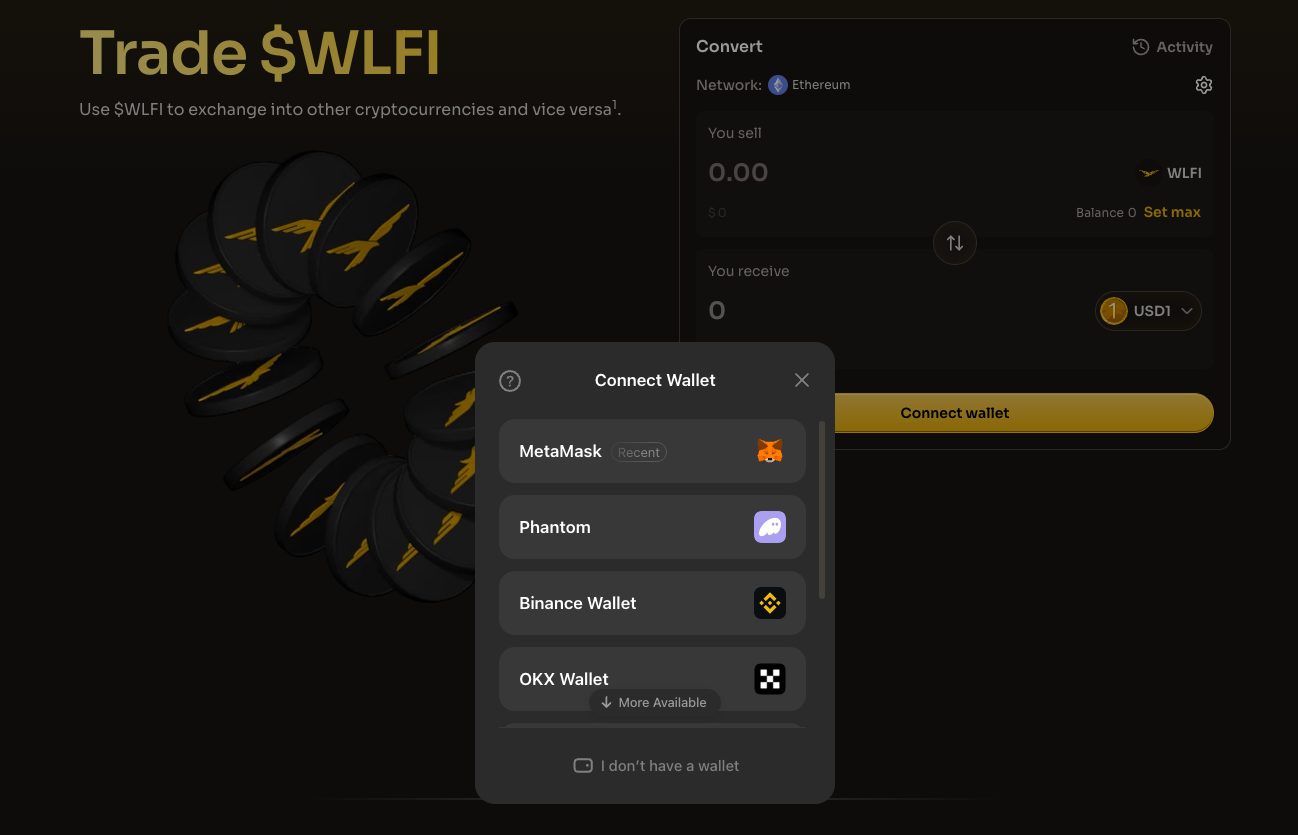
### Step 1: Connect your wallet

Connect a wallet that supports Ethereum Mainnet. Ensure you have:

* The tokens you want to trade
* Sufficient ETH for gas fees

<figure><img src="https://4054725252-files.gitbook.io/~/files/v0/b/gitbook-x-prod.appspot.com/o/spaces%2F2fWzzsd7mWwKk7oKt4dT%2Fuploads%2Fgit-blob-3e152b8d5f3522aeaf265933816ebc6bed2557e3%2Ftrade-connect-wallet.png?alt=media" alt="The Trade page with the Connect Wallet dialog listing MetaMask, Phantom, Binance Wallet and OKX Wallet"><figcaption><p>Choose your wallet provider to connect to Trade</p></figcaption></figure>

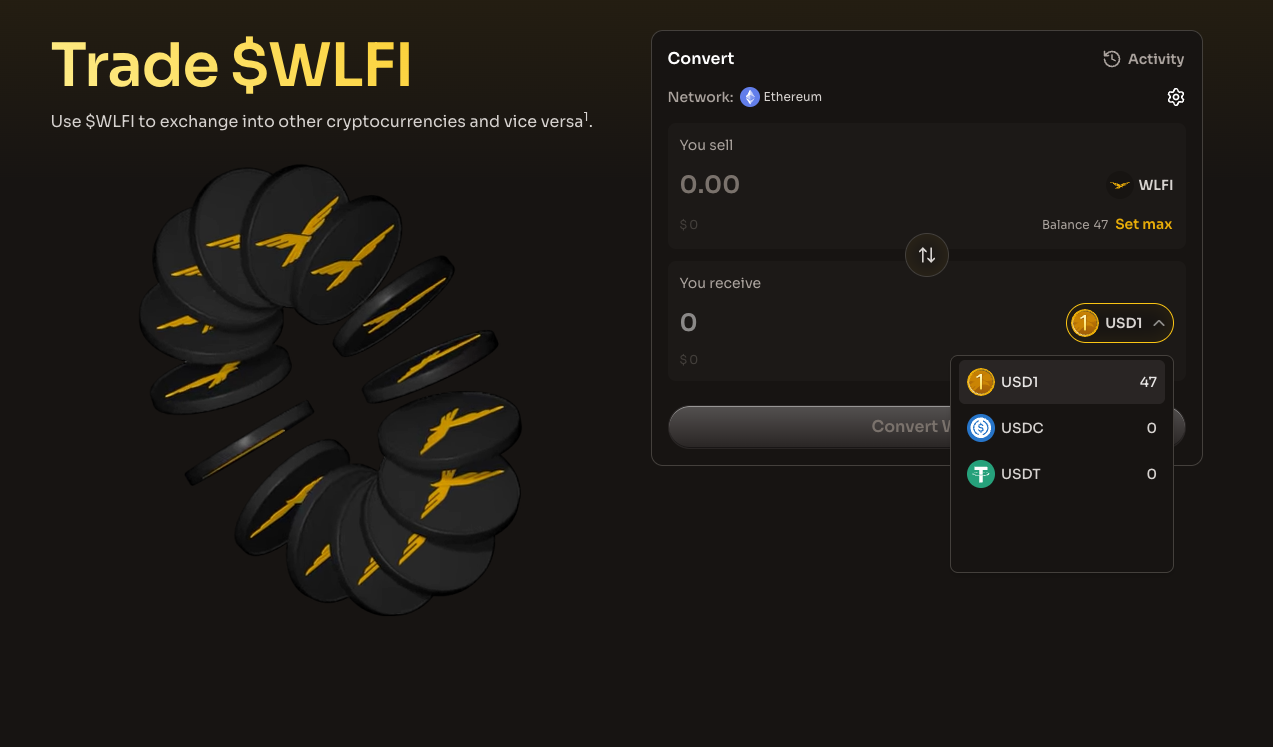
### Step 2: Select tokens

1. **You Sell**: Choose the token you want to trade
2. **You Receive**: The available output tokens will be shown based on your input selection

Use the convert button (↕) to quickly reverse the input and output tokens.

<figure><img src="https://4054725252-files.gitbook.io/~/files/v0/b/gitbook-x-prod.appspot.com/o/spaces%2F2fWzzsd7mWwKk7oKt4dT%2Fuploads%2Fgit-blob-7ec1683c5f918d820ff1812601d26adf6dba6f2b%2Ftrade-select-tokens.png?alt=media" alt="The Convert widget with WLFI selected to sell and the You receive dropdown open showing USD1, USDC and USDT"><figcaption><p>Pick the token you sell and the token you receive</p></figcaption></figure>

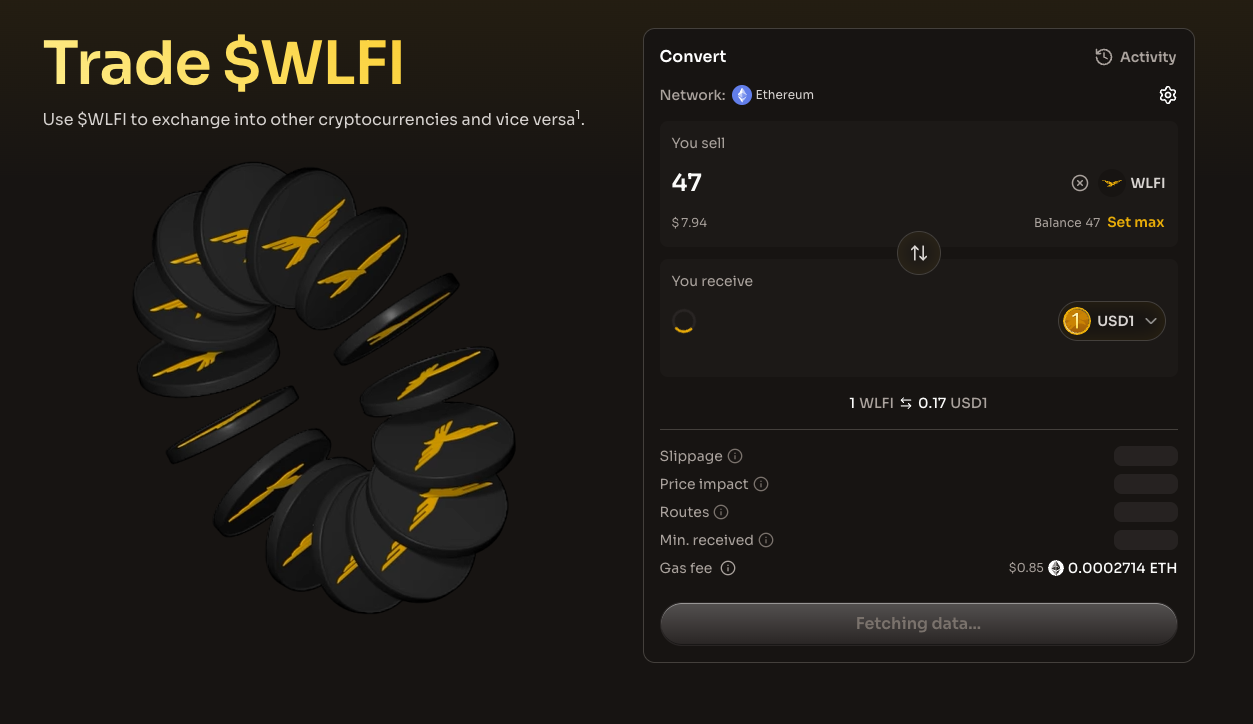
### Step 3: Enter amount

Enter the amount you want to trade. The interface will show:

* The USD value of your input
* The estimated output amount
* The USD value of the output

Click "Set max" to trade your entire balance of the selected token.

<figure><img src="https://4054725252-files.gitbook.io/~/files/v0/b/gitbook-x-prod.appspot.com/o/spaces%2F2fWzzsd7mWwKk7oKt4dT%2Fuploads%2Fgit-blob-381a52a46b4545e7889429328b070ae427dc5671%2Ftrade-amount.png?alt=media" alt="The Convert widget with an amount entered, showing its USD value while the quote loads"><figcaption><p>Enter an amount to fetch a quote</p></figcaption></figure>

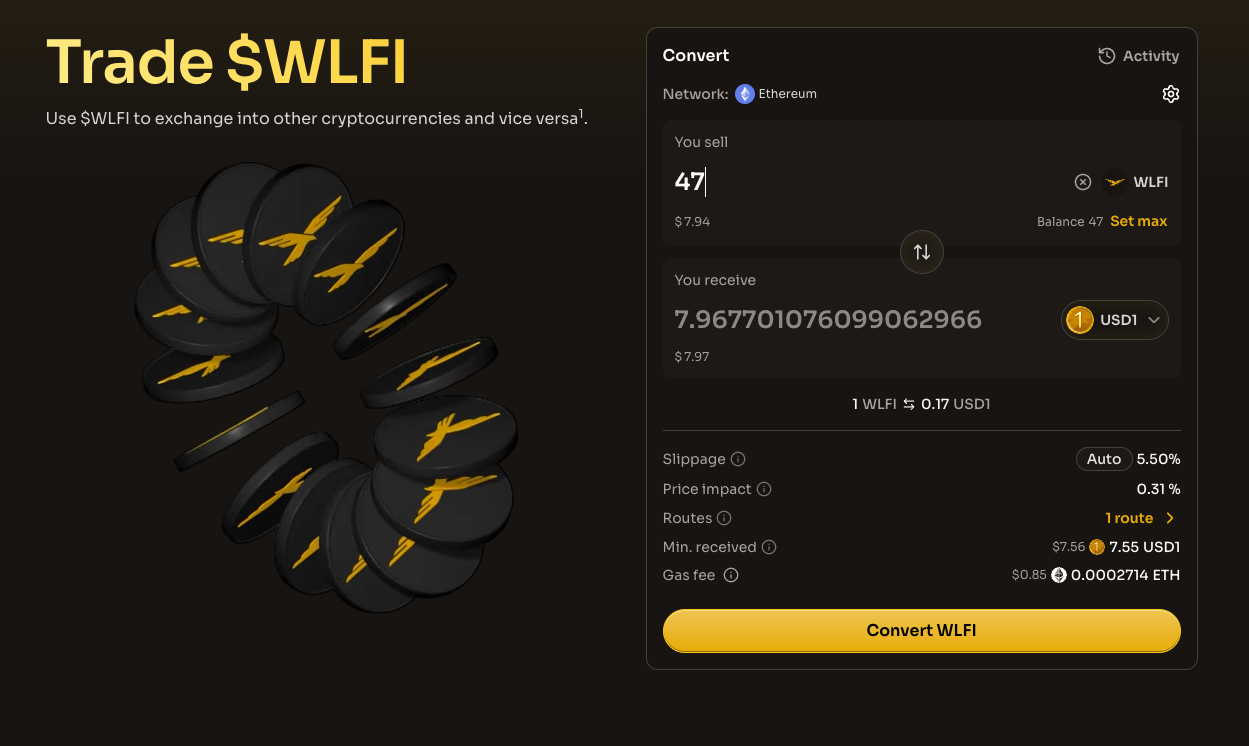
### Step 4: Review trade details

Before confirming, review the following information:

| Detail        | Description                                       |
| ------------- | ------------------------------------------------- |
| Exchange rate | The current rate between the two tokens           |
| Slippage      | Maximum price movement you'll accept              |
| Price impact  | How much your trade affects the market price      |
| Routes        | The path your trade takes through liquidity pools |
| Min. received | The minimum tokens you'll receive after slippage  |
| Gas fee       | Estimated network fee for the transaction         |

<figure><img src="https://4054725252-files.gitbook.io/~/files/v0/b/gitbook-x-prod.appspot.com/o/spaces%2F2fWzzsd7mWwKk7oKt4dT%2Fuploads%2Fgit-blob-7d3b0869d432274ebb1e6f27f2447be8608ad4d5%2Ftrade-review.png?alt=media" alt="The Convert widget showing the quote with slippage, price impact, routes, minimum received and gas fee above the Convert WLFI button"><figcaption><p>Review the rate, slippage, price impact and fees before you confirm</p></figcaption></figure>

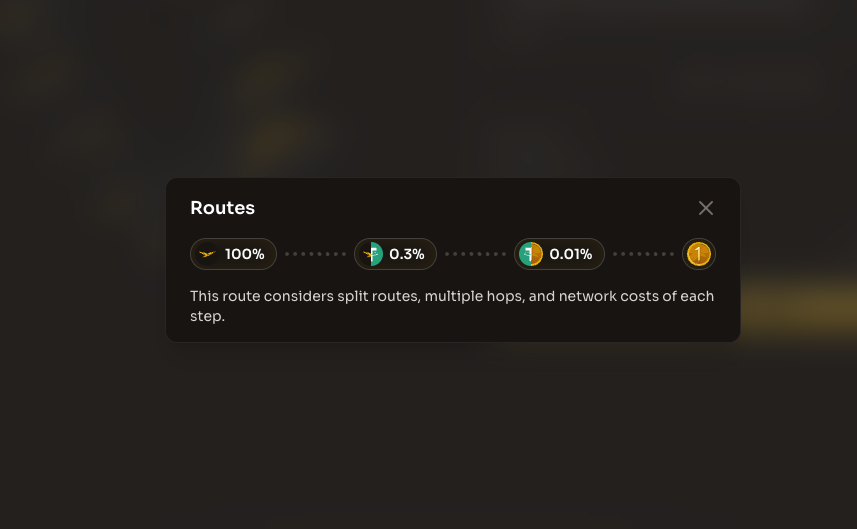
You can click on the Routes row to see a detailed breakdown of how your trade will be routed through the liquidity pools.

<figure><img src="https://4054725252-files.gitbook.io/~/files/v0/b/gitbook-x-prod.appspot.com/o/spaces%2F2fWzzsd7mWwKk7oKt4dT%2Fuploads%2Fgit-blob-718ac2dcdb109ae45b87e0f4f62db4c7e33709e5%2Ftrade-review-routes.png?alt=media" alt="The Routes dialog showing the path of the trade through liquidity pools with the fee tier of each hop"><figcaption><p>The Routes dialog shows each hop of the trade and its pool fee</p></figcaption></figure>

### Step 5: Approve and confirm

{% content-ref url="/pages/k7FBRDEVfpi3uR1lZJCy" %}
[WLFI Risk Disclosures](/wlfi-token/wlfi-risk-disclosures.md)
{% endcontent-ref %}

1. **Agree to terms**: Review and accept the [WLFI Token Use and Acquisition Terms & Conditions](/wlfi-token/wlfi-token-use-and-acquisition-tcs.md)
2. **Token approval** (first time only): Approve the Uniswap router to spend your tokens
3. **Confirm trade**: Review the final details and confirm the transaction in your wallet

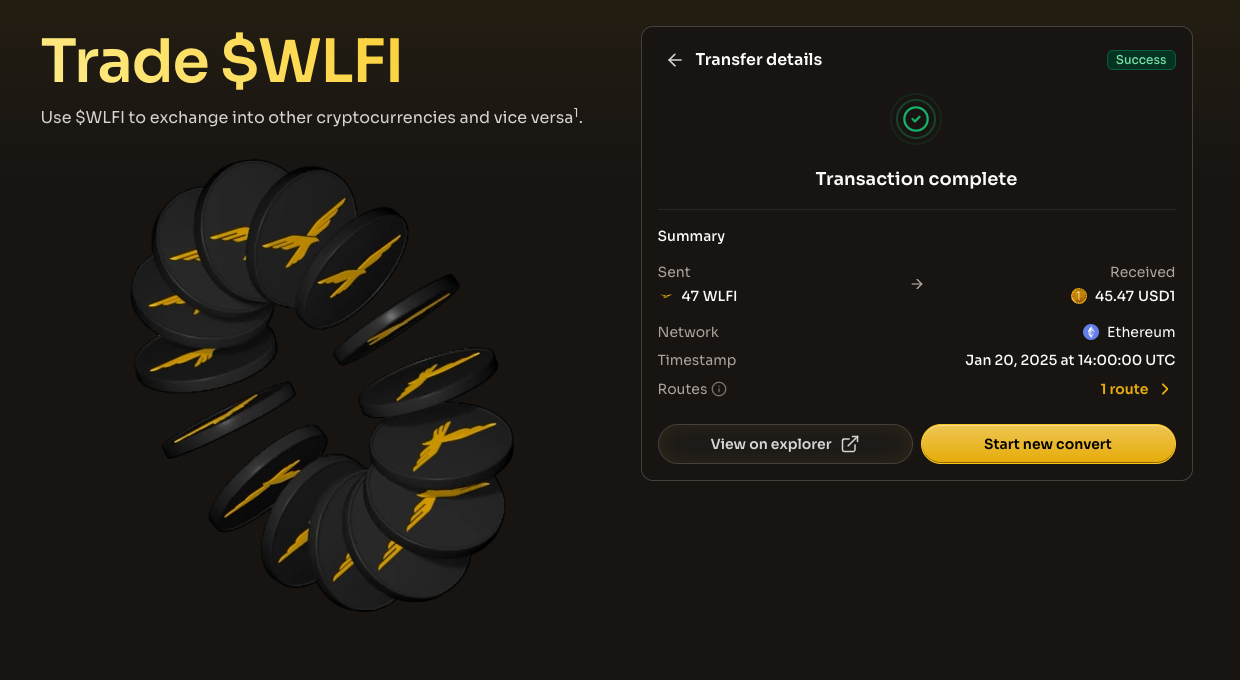
### Step 6: Track your trade

After confirming, you can track your transaction in the **Activity** section. Trades typically complete within a few seconds to a minute, depending on network congestion.

<figure><img src="https://4054725252-files.gitbook.io/~/files/v0/b/gitbook-x-prod.appspot.com/o/spaces%2F2fWzzsd7mWwKk7oKt4dT%2Fuploads%2Fgit-blob-91fb83dd88a1395085dace0685b46a7892e722a2%2Ftrade-summary.png?alt=media" alt="The Transfer details view after a completed trade, showing the amounts sent and received, the network, the timestamp and a View on explorer button"><figcaption><p>The summary confirms the trade and links to the transaction on the explorer</p></figcaption></figure>

## Settings

### Slippage tolerance

Slippage is the difference between the expected price and the actual execution price. You can configure your slippage tolerance in the settings:

| Slippage Level | Description                         |
| -------------- | ----------------------------------- |
| Auto (5.5%)    | Recommended default setting         |
| Custom         | Set your own tolerance (0.1% - 50%) |

{% hint style="warning" %}
**Low slippage** (< 1%): Your transaction may fail if prices move slightly.

**High slippage** (> 10%): You may receive significantly fewer tokens than quoted. The interface will warn you about high slippage settings.
{% endhint %}

### Transaction deadline

The deadline sets how long your transaction remains valid. If the trade isn't executed within this time, it will automatically cancel.

* **Default**: 30 minutes
* **Custom**: Set your preferred deadline

## Understanding price impact

Price impact measures how much your trade will move the market price. It occurs because trades affect the balance of tokens in liquidity pools.

| Price Impact | Indication                                  |
| ------------ | ------------------------------------------- |
| < 1%         | Minimal impact, good liquidity              |
| 1% - 5%      | Moderate impact, acceptable for most trades |
| 5% - 10%     | High impact, consider splitting the trade   |
| > 10%        | Very high impact, warning displayed         |

{% hint style="warning" %}
If the price impact exceeds 10%, the interface will display a warning. Consider:

* Reducing your trade size
* Splitting into multiple smaller trades
* Waiting for better liquidity conditions
  {% endhint %}

## Fees

### Gas fees

All transactions require Ethereum gas fees paid in ETH. Gas costs vary based on:

* Network congestion
* Transaction complexity (number of routes/pools used)

The interface displays an estimated gas fee before you confirm.

### Transactions fees

Uniswap V3 pools charge a fee on each transaction, typically:

* **0.3%** for most pairs
* **0.05%** or **1%** for some pools depending on the pair

These fees are built into the quoted price you see.

***

## Troubleshooting

### Transaction failed

Common reasons for failed transactions:

* **Slippage exceeded**: The price moved beyond your tolerance. Try increasing slippage.
* **Insufficient gas**: Ensure you have enough ETH for gas fees.
* **Token approval expired**: Re-approve the token spend.

### No route found

If no route is found:

* The amount may be too small or too large
* Liquidity may be temporarily low
* Try a slightly different amount

### High price impact warning

If you see a high price impact warning:

* Your trade size is large relative to available liquidity
* Consider breaking into smaller trades
* Wait for more liquidity to enter the pools

### Wrong Network

Trade only works on Ethereum Mainnet. If you're on a different network, you'll be prompted to switch.

## Security considerations

### Smart contract security

Trade uses Uniswap V3's audited and battle-tested smart contracts. Uniswap is one of the most widely used and trusted DeFi protocols.

### User verification

World Liberty Financial implements user verification to ensure compliance. If your account is flagged or blocked, you won't be able to use the Trade feature.

### Approval best practices

When approving tokens:

* Only approve the amount you intend to trade, or
* Revoke approvals after trading if you prefer maximum security

***

## Additional Resources

* [Uniswap Protocol Documentation](https://docs.uniswap.org/concepts/overview)
* [WLFI Token Information](/wlfi-token/tokenomics.md)
* [USD1 Token Information](/usd1-token/what-is-usd1.md)
* [Bridge Tokens Cross-Chain](/wlfi-tools/bridge.md)


---

# Agent Instructions
This documentation is published with GitBook. GitBook is the documentation platform designed so that both humans and AI agents can read, navigate, and reason over technical content effectively. Learn more at gitbook.com.

## Querying This Documentation
If you need additional information that is not directly available in this page, you can query the documentation by asking a question.

Perform an HTTP GET request on the following URL with the `ask` and `goal` query parameters:

```
GET https://docs.worldlibertyfinancial.com/wlfi-token/trade-wlfi.md?ask=<question>&goal=<user_goal>
```

`ask` is the immediate question: it should be specific, self-contained, and written in natural language.
`goal` is what the user is ultimately trying to achieve, the reason they need the answer. Sharing it helps GitBook give you a better, more relevant answer. A goal is most helpful when it describes the outcome the user wants rather than restating the question. For example, with `ask=how do I create an API token`, a goal like `automate deployments from our CI pipeline` lets GitBook tailor the answer to that use case.

The response will contain a direct answer to the question and relevant excerpts and sources from the documentation.

Use this mechanism when the answer is not explicitly present in the current page, you need clarification or additional context, or you want to retrieve related documentation sections.