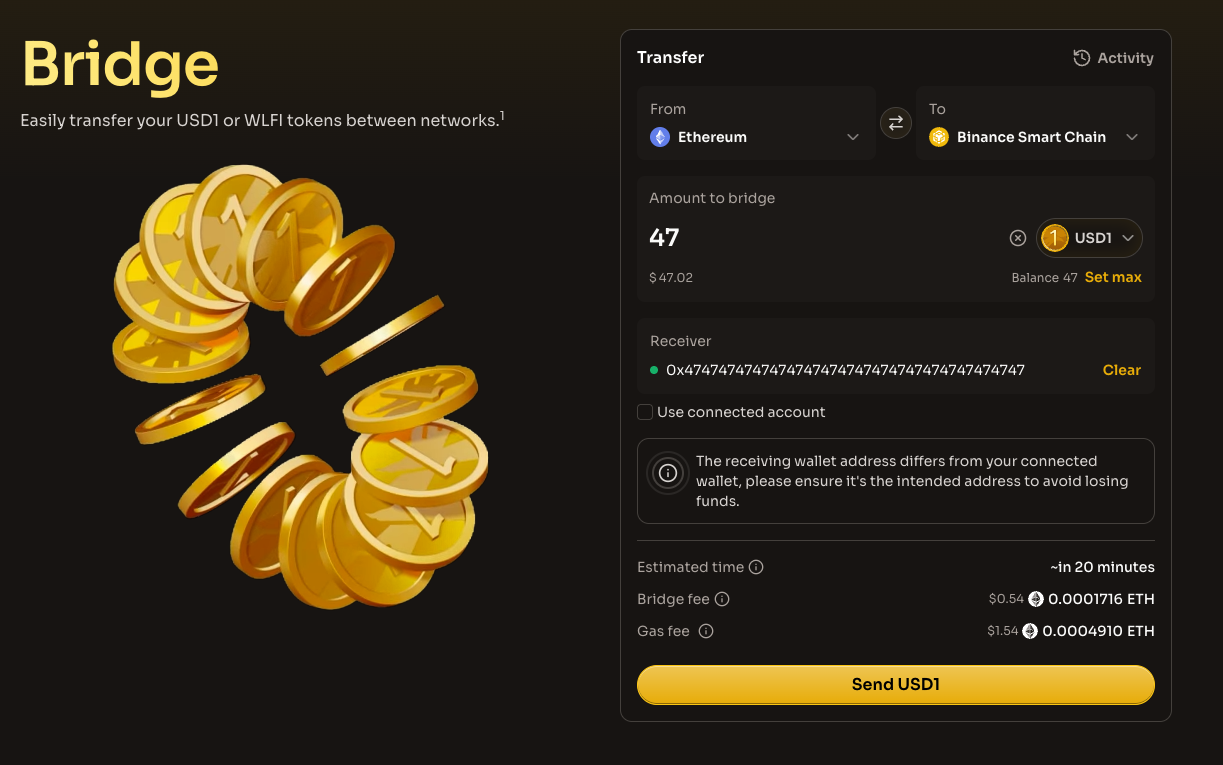
# Bridge

The World Liberty Financial Bridge enables seamless cross-chain transfers of **WLFI** and **USD1** tokens across multiple blockchain networks. Built on [Chainlink CCIP](https://docs.chain.link/ccip) (Cross-Chain Interoperability Protocol), the bridge provides secure, decentralized token transfers with industry-leading security guarantees.

## Overview

The WLFI Bridge leverages Chainlink CCIP to facilitate token transfers between supported networks. CCIP is a blockchain interoperability protocol that enables secure cross-chain token transfers validated by multiple decentralized oracle networks (DONs).

### Key features

* **Multi-chain support**: Bridge tokens across Ethereum, BNB Chain, Solana, Aptos, and other networks
* **Dual token support**: Transfer both WLFI governance tokens and USD1 stablecoins
* **Defense-in-depth security**: Provided by Chainlink's battle-tested oracle infrastructure
* **Rate limiting**: Built-in safeguards to mitigate risk during transfers
* **Custom destination addresses**: Send tokens to any valid address on the destination chain

## Supported tokens

### USD1

USD1 is World Liberty Financial's stablecoin. It can be bridged across the following networks:

| Network   | Bridge direction                          | Token decimals |
| --------- | ----------------------------------------- | -------------- |
| Ethereum  | Source & destination                      | 18             |
| BNB Chain | Source & destination                      | 18             |
| Plume     | Source & destination                      | 18             |
| Aptos     | Source (via Transporter.io) & destination | 8              |
| AB        | Source & destination                      | 18             |
| Monad     | Source & destination                      | 6              |
| Mantle    | Source & destination                      | 18             |
| Morph     | Source & destination                      | 18             |
| Solana    | Source (via Transporter.io) & destination | 6              |

### WLFI

WLFI is the governance token of World Liberty Financial. It can be bridged across:

| Network   | Bridge direction                          | Token decimals |
| --------- | ----------------------------------------- | -------------- |
| Ethereum  | Source & destination                      | 18             |
| BNB Chain | Source & destination                      | 18             |
| Solana    | Source (via Transporter.io) & destination | 6              |

## Supported bridge routes

### USD1 routes

<table data-header-hidden><thead><tr><th width="111.12890625"></th><th width="62.59375"></th><th width="67.37109375"></th><th width="77.4765625"></th><th width="54.96875"></th><th width="78.80078125"></th><th width="78.88671875"></th><th width="77.1953125"></th><th width="75.0078125"></th><th></th></tr></thead><tbody><tr><td><strong>From ↓</strong><br><strong>To →</strong></td><td><strong>ETH</strong></td><td><strong>BNB</strong></td><td><strong>Plume</strong></td><td><strong>AB</strong></td><td><strong>Monad</strong></td><td><strong>Mantle</strong></td><td><strong>Morph</strong></td><td><strong>Aptos</strong></td><td><strong>Solana</strong></td></tr><tr><td><strong>Ethereum</strong></td><td>—</td><td>✅</td><td>✅</td><td>✅</td><td>✅</td><td>✅</td><td>✅</td><td>✅</td><td>✅</td></tr><tr><td><strong>BNB Chain</strong></td><td>✅</td><td>—</td><td>❌</td><td>❌</td><td>❌</td><td>❌</td><td>❌</td><td>✅</td><td>✅</td></tr><tr><td><strong>Plume</strong></td><td>✅</td><td>❌</td><td>—</td><td>❌</td><td>❌</td><td>❌</td><td>❌</td><td>❌</td><td>❌</td></tr><tr><td><strong>AB</strong></td><td>✅</td><td>❌</td><td>❌</td><td>—</td><td>❌</td><td>❌</td><td>❌</td><td>❌</td><td>❌</td></tr><tr><td><strong>Monad</strong></td><td>✅</td><td>❌</td><td>❌</td><td>❌</td><td>—</td><td>❌</td><td>❌</td><td>❌</td><td>❌</td></tr><tr><td><strong>Mantle</strong></td><td>✅</td><td>❌</td><td>❌</td><td>❌</td><td>❌</td><td>—</td><td>❌</td><td>❌</td><td>❌</td></tr><tr><td><strong>Morph</strong></td><td>✅</td><td>❌</td><td>❌</td><td>❌</td><td>❌</td><td>❌</td><td>—</td><td>❌</td><td>❌</td></tr><tr><td><strong>Aptos</strong></td><td>✅*</td><td>✅*</td><td>❌</td><td>❌</td><td>❌</td><td>❌</td><td>❌</td><td>—</td><td>❌</td></tr><tr><td><strong>Solana</strong></td><td>✅*</td><td>✅*</td><td>❌</td><td>❌</td><td>❌</td><td>❌</td><td>❌</td><td>❌</td><td>—</td></tr></tbody></table>

> ✅\* = via [Transporter.io](https://app.transporter.io/)

### WLFI routes

| **From ↓ / To →** | **Ethereum** | **BNB Chain** | **Solana** |
| ----------------- | ------------ | ------------- | ---------- |
| **Ethereum**      | —            | ✅             | ✅          |
| **BNB Chain**     | ✅            | —             | ✅          |
| **Solana**        | ✅\*          | ✅\*           | —          |

> ✅\* = via [Transporter.io](https://app.transporter.io/)

{% hint style="info" %}
Bridging out from Aptos and Solana is currently available via [Transporter.io](https://app.transporter.io/), a third-party bridge interface provided by Chainlink CCIP. This functionality will be accessible through the World Liberty Financial website soon.
{% endhint %}

## How it works

The WLFI Bridge uses two primary token pool mechanisms depending on the network:

### Lock & release (Ethereum)

For WLFI tokens on Ethereum, the bridge uses a **Lock & Release** mechanism:

1. Tokens are locked in a pool on the source chain (Ethereum)
2. Equivalent tokens are released on the destination chain
3. When bridging back, tokens are burned on the destination and released from the lock on Ethereum

## Bridge fees

Bridge fees are paid in the **native token** of the source network:

| Source network | Fee token |
| -------------- | --------- |
| Ethereum       | ETH       |
| BNB Chain      | BNB       |
| Plume          | PLUME     |
| Aptos          | APT       |
| AB             | AB        |
| Monad          | MON       |
| Mantle         | MNT       |
| Morph          | ETH       |
| Solana         | SOL       |

The bridge interface displays the estimated fee in both the native token amount and USD equivalent before you confirm the transaction.

## How to bridge tokens

### Step 1: Connect your wallet

Connect a compatible wallet that supports the source network you want to bridge from.

<figure><img src="/files/d8Dm0IjKCHEEQZOxCGmE" alt=""><figcaption></figcaption></figure>

### Step 2: Select networks

1. Choose your **source network** (From) - the network where your tokens currently reside
2. Choose your **destination network** (To) - where you want to receive the tokens
3. You can click the convert button to quickly reverse the source and destination

<figure><img src="/files/oqUjLzEEQT0Y1lPQkc6l" alt=""><figcaption></figcaption></figure>

### Step 3: Select token and amount

1. Choose either **USD1** or **WLFI** token
2. Enter the amount you wish to bridge
3. Use the "Max" button to bridge your entire balance (respecting rate limits)

<figure><img src="/files/j0uwUSrOof8SyZjWXMKC" alt=""><figcaption></figcaption></figure>

### Step 4: Specify destination address (Optional)

By default, tokens are sent to your connected wallet address on the destination chain. You can specify a different receiving address if needed.

<figure><img src="/files/SVPNfjWWrwsM6JguBGav" alt=""><figcaption></figcaption></figure>

{% hint style="warning" %}
Double-check the destination address before confirming. Sending tokens to an incorrect address may result in permanent loss of funds.
{% endhint %}

### Step 5: Review and confirm

1. Review the transaction details including:
   * Estimated transfer time
   * Bridge fee
   * Amount to be received (after fees, if applicable)
   * Gas fee estimate
2. Approve the token spend if this is your first bridge transaction
3. Confirm the bridge transaction in your wallet

<figure><img src="/files/O7O7jsC72j0twGvjrG6H" alt=""><figcaption></figcaption></figure>

### Step 6: Track your transfer

After submitting, you can track your bridge transaction in the **Activity** section. Bridge transfers typically complete within seconds to minutes, depending on the source and destination chains.

<figure><img src="/files/Ns4vCNfAqzBQGAPH1g7s" alt=""><figcaption></figcaption></figure>

## Rate limits

To protect users and maintain security, the bridge implements rate limiting on token transfers. Rate limits control:

* **Maximum transfer amount** per transaction
* **Refill rate** - how quickly the available capacity replenishes

If you need to bridge an amount exceeding the current rate limit, you may need to split your transfer into multiple transactions or wait for the limit to refill.

## Security

The WLFI Bridge benefits from Chainlink CCIP's robust security framework:

### Decentralized validation

Cross-chain transactions are validated by multiple independent, decentralized oracle networks (DONs), preventing single points of failure.

### Rate limiting

Built-in rate limiting helps mitigate risk by controlling the flow of tokens across chains.

### Security-reviewed node operators

The bridge is secured by globally distributed, security-reviewed node operators with extensive DevOps expertise and rigorous key management practices.

### Proven infrastructure

CCIP leverages the same reliable infrastructure as Chainlink Data Feeds, which has enabled trillions in transaction value across hundreds of DeFi applications.

## Troubleshooting

### Transaction pending

Bridge transactions may take longer during periods of high network congestion. Check the Activity page for status updates.

### Insufficient balance for fees

Ensure you have enough native tokens (ETH, BNB, etc.) to cover both the bridge fee and gas costs.

### Unsupported route

If you see a message that a route is not supported, check the [Supported Bridge Routes](#supported-bridge-routes) section for available options.

### Rate limit exceeded

If your transfer amount exceeds the rate limit, try bridging a smaller amount or wait for the limit to refill.

## Additional Resources

* [Chainlink CCIP Documentation](https://docs.chain.link/ccip)
* [USD1 Token Information](/usd1-token/what-is-usd1.md)
* [WLFI Token Information](/wlfi-token/tokenomics.md)
* [Contract Addresses](/usd1-token/contract-addresses.md)


---

# Agent Instructions: Querying This Documentation

If you need additional information that is not directly available in this page, you can query the documentation dynamically by asking a question.

Perform an HTTP GET request on the current page URL with the `ask` query parameter:

```
GET https://docs.worldlibertyfinancial.com/wlfi-tools/bridge.md?ask=<question>
```

The question should be specific, self-contained, and written in natural language.
The response will contain a direct answer to the question and relevant excerpts and sources from the documentation.

Use this mechanism when the answer is not explicitly present in the current page, you need clarification or additional context, or you want to retrieve related documentation sections.