> For the complete documentation index, see [llms.txt](https://docs.worldlibertyfinancial.com/llms.txt). Markdown versions of documentation pages are available by appending `.md` to page URLs; this page is available as [Markdown](https://docs.worldlibertyfinancial.com/agentpay-sdk/workflows.md).
# Workflows
The install pages put the SDK on the machine. The workflow pages explain how to operate it successfully after that point.
All operations described below execute locally on the operator's machine. WLFI does not custody, process, or facilitate any transaction.
## Core workflow
1. [Create or reuse a wallet](/agentpay-sdk/workflows/wallet-setup.md) - includes encrypted offline backup
2. [Fund the wallet](/agentpay-sdk/workflows/funding.md)
3. [Define the base spending policy](/agentpay-sdk/workflows/policy.md)
4. [Add manual approval](/agentpay-sdk/workflows/manual-approval.md) - only if some requests should pause for human review
5. [Submit transfer requests](/agentpay-sdk/workflows/transfers.md)
6. [Use Machine Payments Protocol (MPP)](/agentpay-sdk/workflows/mpp.md)
That is the main product path. Everything else is supporting configuration or maintenance.
## Request execution path
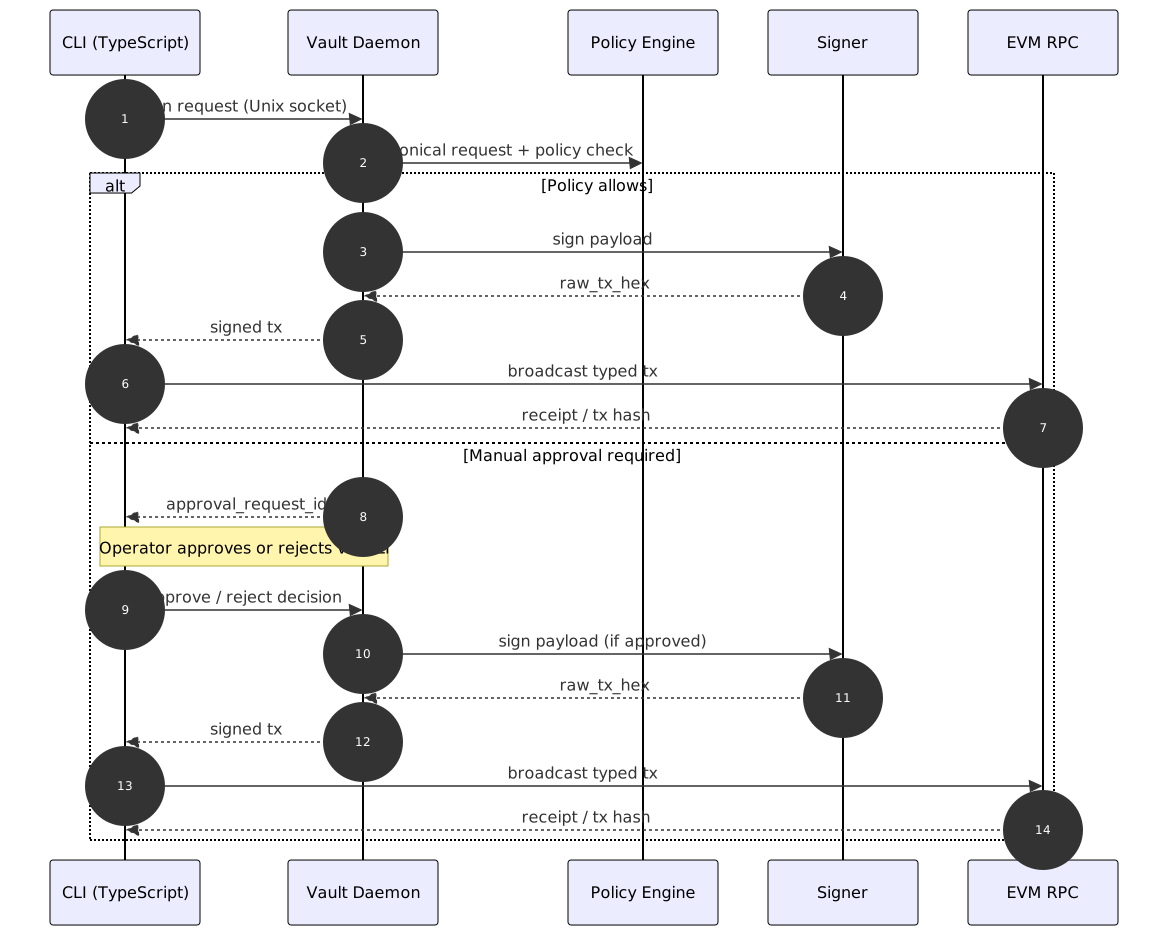
Once the wallet is funded and policy exists, every transfer request follows one of two security-controlled runtime paths: it either clears policy and broadcasts immediately, or it pauses for manual approval.
The local daemon is the enforcement point: policy is checked before signing, and signing happens locally.
Read the sequence from left to right:
* **Request -> Policy** — The CLI submits the request to the local daemon via Unix socket. The daemon forwards it to the Policy Engine (`vault-policy` / `PolicyEngine`) for evaluation against all applicable policies. Policy always runs before signing. See [Policy](/agentpay-sdk/workflows/policy.md) for how `AllPolicies` vs `PolicySet` attachments affect evaluation.
* **Auto-approve path** — If policy allows the request, the daemon delegates to the signer (`vault-signer`), which returns `raw_tx_hex`. The CLI then broadcasts to the EVM RPC and returns the result.
* **Manual approval path** — If a manual approval rule matches, the daemon pauses the request and returns an approval ID. The operator approves via local CLI. After approval, the daemon signs and the CLI broadcasts.
That second branch is configured through [Manual approval](/agentpay-sdk/workflows/manual-approval.md).
## Use Machine Payments Protocol (MPP)
Use this step when the workflow includes an MPP-enabled endpoint.
AgentPay SDK supports both `agentpay mpp` and `agentpay x402` for this path.
Continue to [Machine Payments Protocol (MPP)](/agentpay-sdk/workflows/mpp.md) for the full MPP / x402 flow, examples, amount handling, and session notes.
## Supporting pages
* [Use cases](/agentpay-sdk/use-cases.md) - concrete day-to-day scenarios including gift card purchases
* [Agent auth](/agentpay-sdk/workflows/agent-auth.md) - credential rotation and migration
* [Reset and uninstall](/agentpay-sdk/workflows/reset-and-uninstall.md) - clear state or remove AgentPay SDK
* [Troubleshooting](/agentpay-sdk/workflows/troubleshooting.md) - common errors and repair
## Recommended first live test
If you want one realistic end-to-end validation path, use this:
1. Run `agentpay admin setup`
2. Fund the wallet on the EVM network you plan to use
3. Define a modest base policy for routine transfers
4. Submit a small test transfer that should clear policy
5. Add a manual approval threshold for larger requests
6. Submit a larger test transfer that should trigger manual approval
7. Approve it through the local admin CLI
The default reference example in these docs uses BSC and USD1, but the same sequence applies on any supported EVM network once your chain and token settings are correct.
---
# Agent Instructions
This documentation is published with GitBook. GitBook is the documentation platform designed so that both humans and AI agents can read, navigate, and reason over technical content effectively. Learn more at gitbook.com.
## Querying This Documentation
If you need additional information that is not directly available in this page, you can query the documentation by asking a question.
Perform an HTTP GET request on the following URL with the `ask` and `goal` query parameters:
```
GET https://docs.worldlibertyfinancial.com/agentpay-sdk/workflows.md?ask=&goal=
```
`ask` is the immediate question: it should be specific, self-contained, and written in natural language.
`goal` is what the user is ultimately trying to achieve, the reason they need the answer. Sharing it helps GitBook give you a better, more relevant answer. A goal is most helpful when it describes the outcome the user wants rather than restating the question. For example, with `ask=how do I create an API token`, a goal like `automate deployments from our CI pipeline` lets GitBook tailor the answer to that use case.
The response will contain a direct answer to the question and relevant excerpts and sources from the documentation.
Use this mechanism when the answer is not explicitly present in the current page, you need clarification or additional context, or you want to retrieve related documentation sections.