> For the complete documentation index, see [llms.txt](https://docs.worldlibertyfinancial.com/llms.txt). Markdown versions of documentation pages are available by appending `.md` to page URLs; this page is available as [Markdown](https://docs.worldlibertyfinancial.com/wlfi-token/unlock-wlfi.md).

# Unlock $WLFI

The Unlock feature allows early supporters who purchased WLFI tokens during the initial sale rounds to unlock their tokens according to a defined schedule. This page explains everything you need to know about the unlock process, eligibility, and how to claim your tokens.

## Overview

Between approximately **October 14, 2024 and March 14, 2025**, WLFI tokens were sold to participants at prices of $0.015 and $0.05 per token. These tokens were initially non-transferable and held in participants' wallets.

On around **September 1, 2025**, twenty percent (20%) of tokens purchased during these rounds became available for unlocking. To access these tokens, eligible participants must sign a Token Unlock Agreement and complete the activation process.

Following the initial 20% unlock, on or around May 6, 2026, the WLFI community passed a governance proposal establishing a structured unlock schedule for all remaining locked tokens.

If you have not yet completed the first unlock (20%), you can follow the [#step-by-step-tutorial](#step-by-step-tutorial "mention")

### Early Supporter Unlock - Key Points

* **Early Supporter Eligibility**: Only participants from the $0.015 and $0.05 sale rounds
* **Agreement Required**: You must sign the Token Unlock Agreement and Terms of Service to start unlocking

| **Initial Unlock (20%)**                                  | 20% of your allocation became available on or about September 1, 2025                                                                                                                                                    |
| --------------------------------------------------------- | ------------------------------------------------------------------------------------------------------------------------------------------------------------------------------------------------------------------------ |
| **Remaining 80%**                                         | Will be unlocked according to the terms decided by the community through the [governance proposal](https://vote.worldlibertyfinancial.com/#/proposal/0x7389a30748bf921066fba2d63281e34718b141cef9f54fcb4ed5cd4566f94873) |
| **Total early supporter tokens subject to this schedule** | 17,043,666,558 WLFI                                                                                                                                                                                                      |
| **Unlock type**                                           | 2-year cliff, then 2-year linear unlock                                                                                                                                                                                  |
| **Tokens begin unlocking**                                | Year 2 from proposal passing date                                                                                                                                                                                        |
| **Fully distributed by**                                  | Year 4 from proposal passing date                                                                                                                                                                                        |

{% hint style="info" %}
Accepting this unlock schedule is opt-in. Holders who do not affirmatively accept will continue to have their tokens locked indefinitely and retain the ability to use all their tokens for governance participation, subject to the terms of any future unlock proposals. No tokens are burned under the Early Supporter schedule.
{% endhint %}

{% hint style="info" %}
Founders, Team members, advisors, and certain other token holders are subject to a [different unlock schedule](#founders-team-members-and-advisors).
{% endhint %}

## Am I eligible?

You are eligible for the early supporter unlock feature if you:

1. Purchased WLFI tokens during the public sale between approximately October 14, 2024 and March 14, 2025
2. Participated in either the $0.015 or $0.05 price rounds
3. Still hold the tokens in the original wallet that received them
4. Have not transferred beneficial ownership of your wallet or tokens

If you did not participate in the original token sale, you cannot use the unlock feature. To acquire WLFI tokens, you can [trade on supported exchanges](/wlfi-token/trade-wlfi.md).

## How unlocking works

### Smart contract architecture

The unlock process involves three key smart contracts:

| Contract               | Purpose                                                                        |
| ---------------------- | ------------------------------------------------------------------------------ |
| **WLFI Token**         | The token smart contract with activation and claiming functions                |
| **Registry**           | Stores information about legacy users (early purchasers) and their allocations |
| **Unlocking Contract** | Holds tokens and releases them according to the unlock schedule                |

### The unlock flow

#### Early Supporter - Initial unlock (20%):

1. **Activation**: You sign the Token Unlock Agreement and Terms of Service and submit a transaction
2. **Token Transfer**: Your WLFI tokens move from your wallet to the unlocking smart contract
3. **Wallet Balance**: Your wallet will show 0 WLFI (this is expected)
4. **Unlocking**: Tokens unlock according to the schedule
5. **Claiming**: You can claim unlocked tokens at any time, transferring them back to your wallet

#### Early Supporter - Remaining 80%:

1. **Activation:** You sign the Token Unlock Agreement and Terms of Service and submit a transaction
2. **Cliff Period:** For the first 2 years, no tokens are claimable
3. **Allocation Visibility:** You can view your full allocation and projected unlock schedule during the cliff
4. **Unlocking:** After the 2-year cliff, tokens unlock continuously over the following 2 years
5. **Claiming:** Your claimable amount increases over time, and you can claim at any point
6. **Accumulation:** Unclaimed tokens continue to accumulate if you do not claim them immediately
7. **Deadline:** There is no fixed claim schedule, and no deadline to claim
8. **Full Distribution:** By year 4, your full allocation is unlocked and available to claim

### Unlock schedule

| Phase                         | Percentage | Status    |
| ----------------------------- | ---------- | --------- |
| Initial Unlock (Sept 1, 2025) | 20%        | Available |
| Second Unlock (May 6, 2026)   | 80%        | Available |

### Accepting the unlock schedules

To participate in these unlocks, you must affirmatively accept the new unlock schedule. Acceptance requires you to accept the new unlock schedule, the Terms of Service, and electronically make acknowledgements and agreements relating to the terms and meet any eligibility requirements determined to be necessary or advisable under applicable law.

If you do not accept, your tokens remain locked indefinitely. You will continue to be able to use all your tokens for governance participation, subject to the terms of any future unlock proposals.<br>

## Step-by-step tutorial <a href="#step-by-step-tutorial" id="step-by-step-tutorial"></a>

## Early Supporters

### Before you begin

Ensure you have:

* A wallet that was used in the original WLFI token purchase
* ETH in your wallet for gas fees
* Access to the [WLFI Unlock page](https://worldlibertyfinancial.com/unlock)

### Step 1: Connect your wallet

Visit the [Unlock page](https://worldlibertyfinancial.com/unlock) and connect the wallet that holds your WLFI allocation.

Ensure your wallet network is set to Ethereum Mainnet.

<figure><img src="https://4054725252-files.gitbook.io/~/files/v0/b/gitbook-x-prod.appspot.com/o/spaces%2F2fWzzsd7mWwKk7oKt4dT%2Fuploads%2FU1QHVH4DHpQ1Ie33tnC5%2Fimage.png?alt=media&amp;token=ace8db06-0fcc-4d55-872e-f7c9acc53c82" alt="The Unlock page before a wallet is connected, with the Connect your wallet card, the How unlocking works steps and a Connect wallet button"><figcaption><p>Connect your wallet to see your unlocking schedules</p></figcaption></figure>

### Step 2: Review your allocation

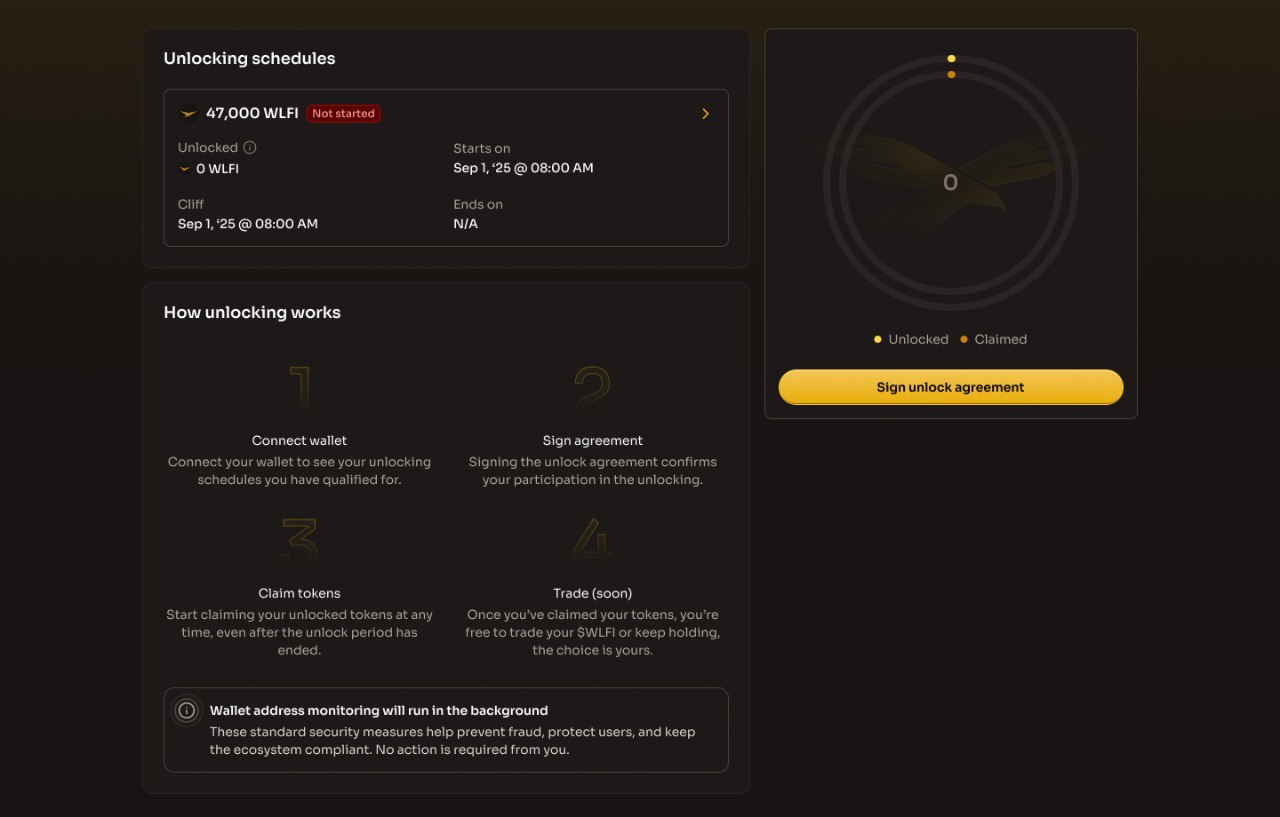
Once connected, the interface displays:

* Your total token allocation
* How much will be unlocked (20% of your allocation)
* The unlock date and time

<figure><img src="https://4054725252-files.gitbook.io/~/files/v0/b/gitbook-x-prod.appspot.com/o/spaces%2F2fWzzsd7mWwKk7oKt4dT%2Fuploads%2FXWqAeK9Llr7oBn0skAbx%2Fimage.png?alt=media&amp;token=7a5a6aa5-1ddb-4fd1-bd84-e65321e9ffec" alt="The Unlocking your $WLFI card marked Action required, listing the initial 20% unlock and the remaining 80% steps with a Sign unlock agreement button, above the Unlocking schedules card and the allocation ring"><figcaption><p>Your allocation and the two unlock steps appear once your wallet is connected</p></figcaption></figure>

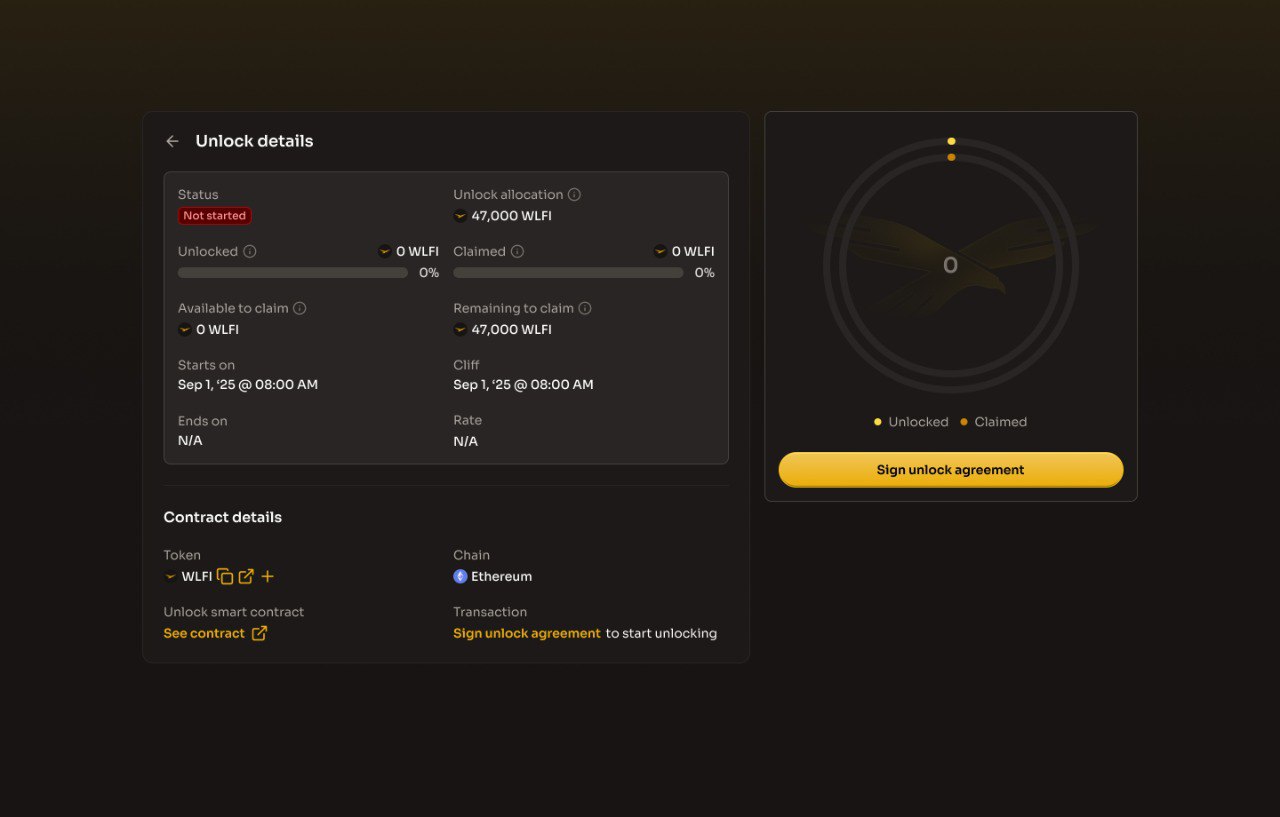
<figure><img src="https://4054725252-files.gitbook.io/~/files/v0/b/gitbook-x-prod.appspot.com/o/spaces%2F2fWzzsd7mWwKk7oKt4dT%2Fuploads%2FwXqR4UJYmdrSx9HLvzEe%2Fimage.png?alt=media&amp;token=19d16225-bb2f-41ff-9648-530c2895db29" alt="The Unlock details view for the initial 20% schedule, showing its status, allocation, claimable amount, dates and contract details"><figcaption><p>Open a schedule to see its allocation, cliff and contract details</p></figcaption></figure>

### Step 3: Review the token unlock agreement

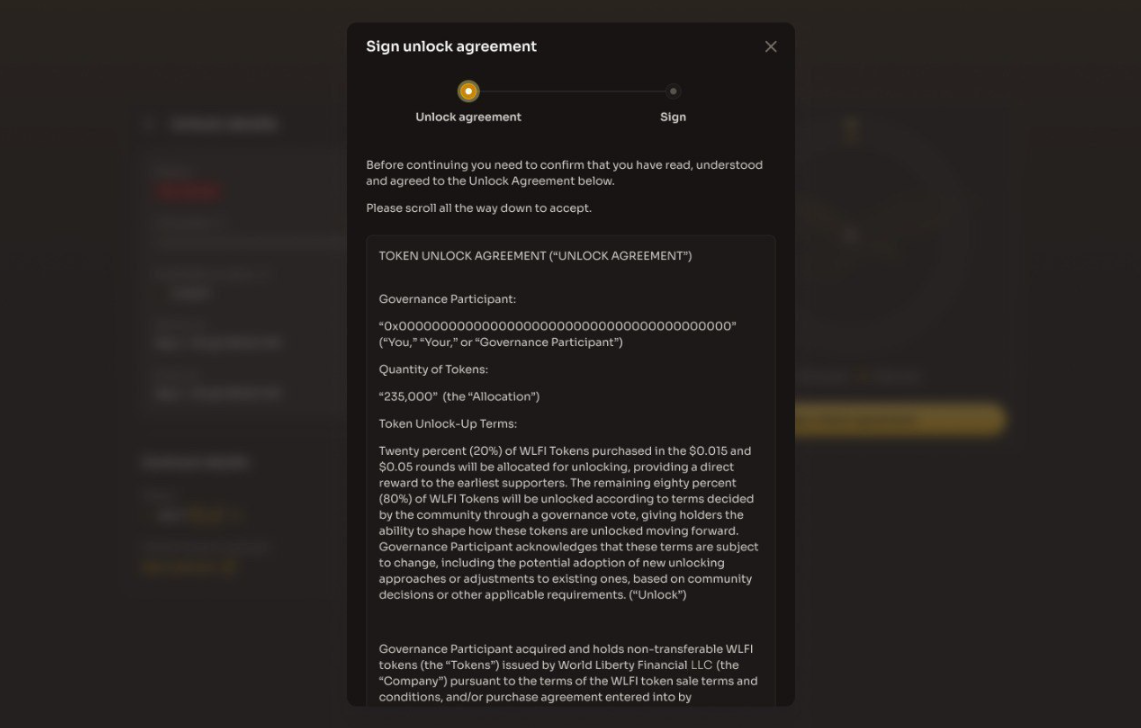
Click **"Sign unlock agreement"** to open the agreement dialog. The Token Unlock Agreement displays:

* Your wallet address
* Your total token allocation
* The terms and conditions of the unlock

**Important**: Read the entire agreement carefully before proceeding. The agreement includes important representations about:

* Ownership of your wallet
* Use of tokens for governance purposes
* Compliance with applicable laws
* Acknowledgment of the unlock terms

<figure><img src="https://4054725252-files.gitbook.io/~/files/v0/b/gitbook-x-prod.appspot.com/o/spaces%2F2fWzzsd7mWwKk7oKt4dT%2Fuploads%2FeOgJP5R5Xubj7l0QPn9h%2Fimage.png?alt=media&amp;token=7a829f67-191a-4431-97aa-60dae4bb1f3e" alt="The Sign unlock agreement dialog on the Unlock agreement step, showing the start of the Early Supporter Token Unlock Agreement"><figcaption><p>Read the unlock agreement in full; the dialog has three steps</p></figcaption></figure>

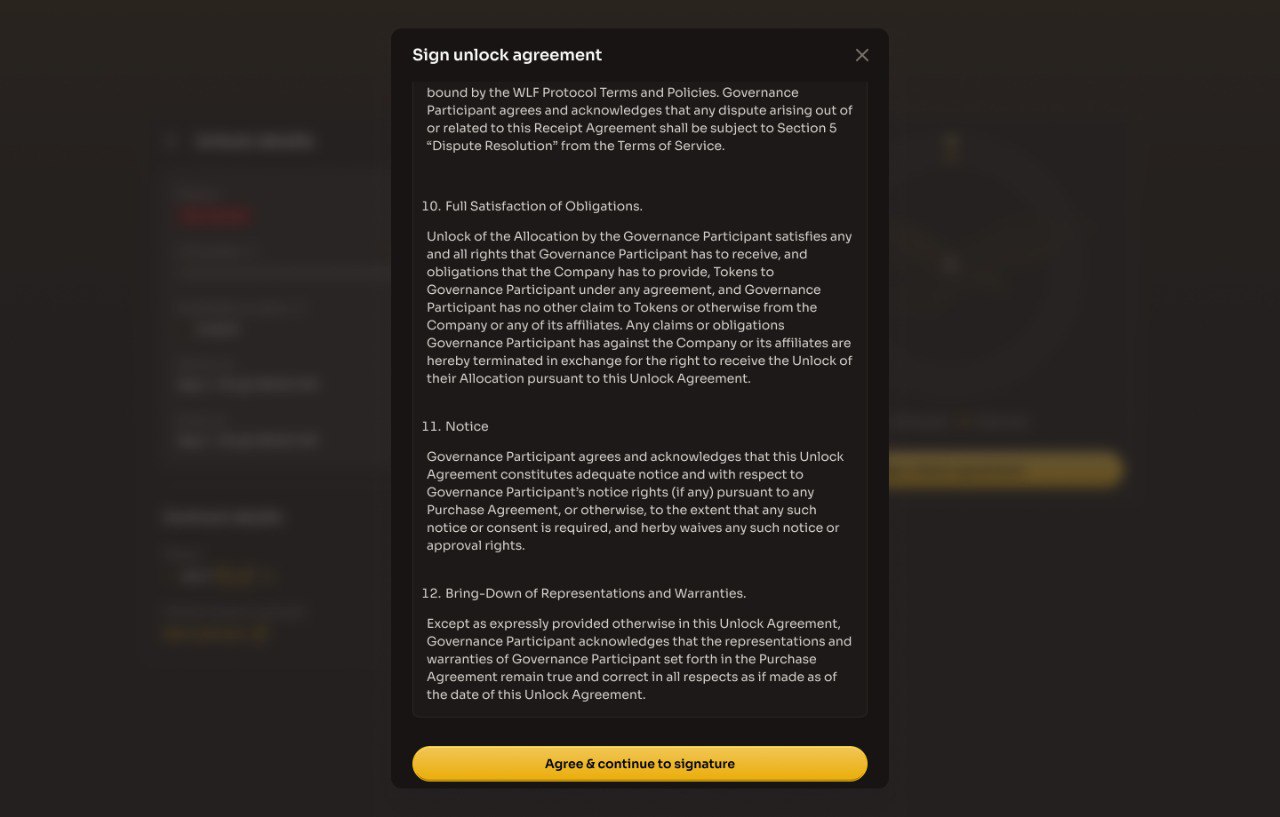
You must scroll to the bottom of the agreement to find the confirmation button. This ensures you have reviewed all the terms.

Click **"I agree"** to proceed to the Terms of Service step.

<figure><img src="https://4054725252-files.gitbook.io/~/files/v0/b/gitbook-x-prod.appspot.com/o/spaces%2F2fWzzsd7mWwKk7oKt4dT%2Fuploads%2FtwxamNtpMPphSRx8TpOi%2Fimage.png?alt=media&amp;token=97f3ba21-2b72-4ec5-a20a-629b5fd5cde7" alt="The Sign unlock agreement dialog scrolled to the end of the unlock agreement with the I agree button"><figcaption><p>Scroll to the end of the agreement to enable I agree</p></figcaption></figure>

### Step 4: Review & accept the Terms of Service

**Important**: Read the entire Terms of Service carefully before proceeding.

<figure><img src="https://4054725252-files.gitbook.io/~/files/v0/b/gitbook-x-prod.appspot.com/o/spaces%2F2fWzzsd7mWwKk7oKt4dT%2Fuploads%2Fd18EfqD6tTpzV7JtIHoZ%2Fimage.png?alt=media&amp;token=d70b2b6f-d7cd-4cf8-9be8-d21e01926a5e" alt="The Sign unlock agreement dialog on the Terms of Service step, showing the start of the WLFI Terms of Service"><figcaption><p>Review the WLFI Terms of Service on the second step</p></figcaption></figure>

You must scroll to the bottom of the agreement to find the confirmation button. This ensures you have reviewed all the terms.

Click **"I agree"** to proceed to the Signing step.

<figure><img src="https://4054725252-files.gitbook.io/~/files/v0/b/gitbook-x-prod.appspot.com/o/spaces%2F2fWzzsd7mWwKk7oKt4dT%2Fuploads%2FfDDHrO4guzMZUsBc4kS1%2Fimage.png?alt=media&amp;token=77d41961-3159-46a2-afcd-38f14c53b9f3" alt="The end of the Terms of Service with the I agree button"><figcaption><p>Scroll to the end of the terms and click I agree</p></figcaption></figure>

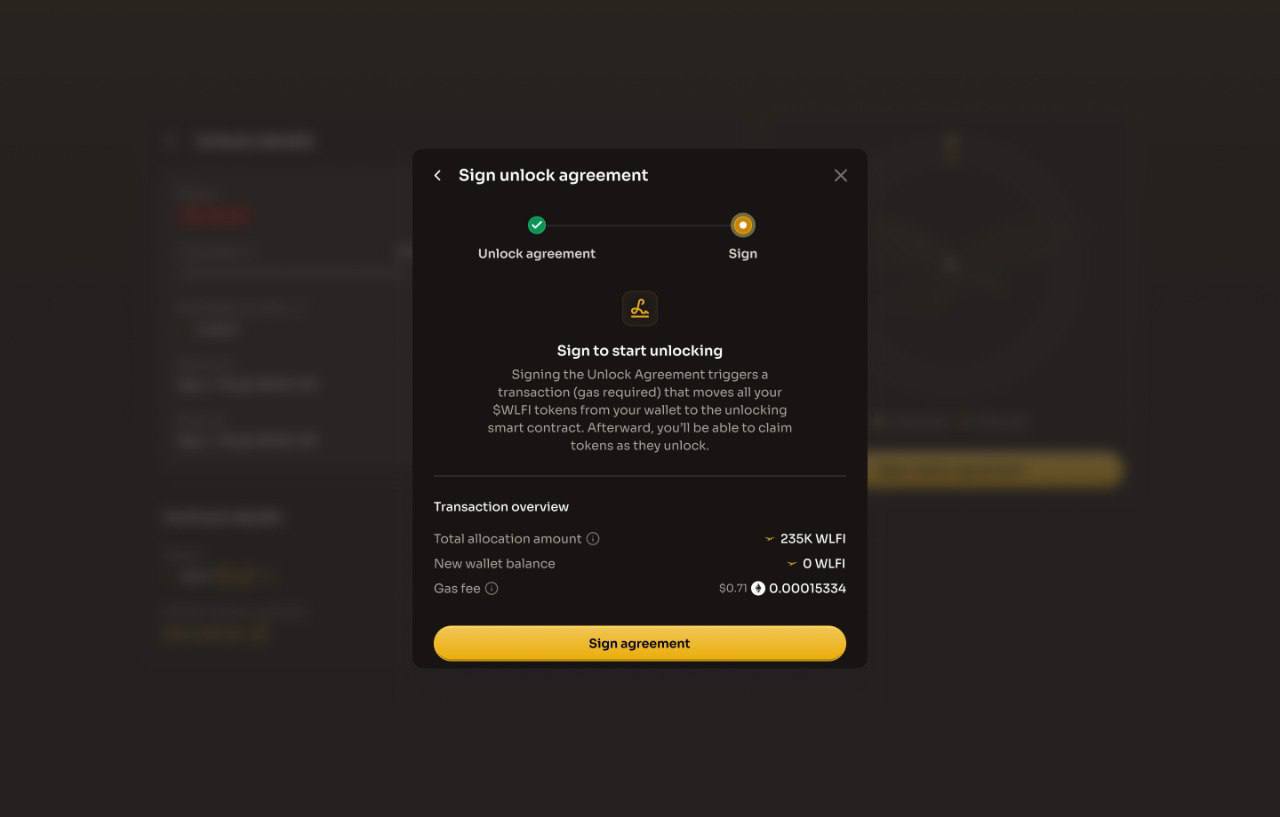
### Step 5: Sign the transaction

A signature prompt will appear in your wallet. When you sign:

1. **Transaction submission**: A transaction is submitted to the blockchain
2. **Token movement**: Your tokens move from your wallet to the unlocking contract
3. **Total allocation amount:** The total number of WLFI available to be unlocked
4. **New Wallet balance**: Your wallet will display the WLFI balance
5. **Remaining to unlock:** The remaining tokens (80%) available to unlock in phase 2
6. **Gas fee:** The amount of ETH required to sign the transaction

<figure><img src="https://4054725252-files.gitbook.io/~/files/v0/b/gitbook-x-prod.appspot.com/o/spaces%2F2fWzzsd7mWwKk7oKt4dT%2Fuploads%2FwEqMlisWc5RmD6j5n4if%2Fimage.png?alt=media&amp;token=efffcc98-e32a-4e90-951b-293173400203" alt="The Sign step of the Sign unlock agreement dialog, showing the transaction overview with the total allocation, new wallet balance, remaining to unlock and gas fee, and the Sign agreement button"><figcaption><p>Review the transaction overview, then click Sign agreement</p></figcaption></figure>

<figure><img src="https://4054725252-files.gitbook.io/~/files/v0/b/gitbook-x-prod.appspot.com/o/spaces%2F2fWzzsd7mWwKk7oKt4dT%2Fuploads%2FBo4D5xJ3PvWsCgEJ72dj%2Fimage.png?alt=media&amp;token=ab286782-9aa6-46fe-8d5f-eefcac719a79" alt="The Sign unlock agreement dialog showing Transaction complete, with a View tx on Explorer link and a Close button"><figcaption><p>The transaction moves your tokens to the unlock contract and claims any already unlocked</p></figcaption></figure>

{% hint style="info" %}
**Automatic claim**: Any tokens that are already unlocked will be claimed automatically as part of this transaction
{% endhint %}

### Step 6: Claim your 20% unlocked tokens

By the end of the transaction, your initial 20% unlocked tokens will be transferred to your wallet.

<figure><img src="https://4054725252-files.gitbook.io/~/files/v0/b/gitbook-x-prod.appspot.com/o/spaces%2F2fWzzsd7mWwKk7oKt4dT%2Fuploads%2FT9sUaSI7qtwfP1MUynWs%2Fimage.png?alt=media&amp;token=728e73d3-50b1-41d9-ba73-f939caeb8f33" alt="The Unlock details view for the initial 20% schedule with the status Claimed and the unlocked and claimed bars at 100%"><figcaption><p>The initial 20% shows as Claimed once the transaction confirms</p></figcaption></figure>

### Step 7: Activate the remaining 80% token unlock agreement

Click "Activate unlock schedule" to open the agreement dialog.

The Token Unlock Agreement displays:

* Your wallet address
* Your total token allocation
* The remaining amount of tokens left to unlock (should be 0 WLFI)
* The terms and conditions of the unlock

<figure><img src="https://4054725252-files.gitbook.io/~/files/v0/b/gitbook-x-prod.appspot.com/o/spaces%2F2fWzzsd7mWwKk7oKt4dT%2Fuploads%2FHeP7wONv2EPoAXksfg4v%2Fimage.png?alt=media&amp;token=2b26c1c5-9d9c-4819-93aa-c46fb913bf9c" alt="The Unlocking your $WLFI card with the initial 20% step completed and the Activate unlock schedule button for the remaining 80%"><figcaption><p>Once the initial 20% is claimed, the card offers Activate unlock schedule</p></figcaption></figure>

### Step 8: Review the Activate unlock agreement

Click **"Activate unlock schedule"** to open the agreement dialog. The Activate Unlock Agreement displays:

* Your wallet address
* Your total token allocation
* The terms and conditions of the unlock

**Important**: Read the entire agreement carefully before proceeding. The agreement includes important representations about:

* Ownership of your wallet
* Use of tokens for governance purposes
* Compliance with applicable laws
* Acknowledgment of the unlock terms

<figure><img src="https://4054725252-files.gitbook.io/~/files/v0/b/gitbook-x-prod.appspot.com/o/spaces%2F2fWzzsd7mWwKk7oKt4dT%2Fuploads%2FOADZQui9SNGCNU9X2tQC%2Fimage.png?alt=media&amp;token=a427aed0-fd62-4d0b-8f18-305c8f1aba12" alt="The Activate unlock schedule dialog on the Unlock agreement step, showing the start of the Second Early Supporter Token Unlock Agreement"><figcaption><p>The second unlock agreement requires the initial unlock to have been completed</p></figcaption></figure>

You must scroll to the bottom of the agreement to find the confirmation button. This ensures you have reviewed all the terms.

Click **"I agree"** to proceed to the Terms of Service step.

<figure><img src="https://4054725252-files.gitbook.io/~/files/v0/b/gitbook-x-prod.appspot.com/o/spaces%2F2fWzzsd7mWwKk7oKt4dT%2Fuploads%2FGHrqQBRvGcQMy2SYDaQY%2Fimage.png?alt=media&amp;token=bc43740f-6db7-4bd6-88fc-ebf40ad1a547" alt="The Activate unlock schedule dialog scrolled to the end of the second unlock agreement with the I agree button"><figcaption><p>Scroll to the end of the second agreement to enable I agree</p></figcaption></figure>

### Step 9: Review & accept the Terms of Service

**Important**: Read the entire Terms of Service carefully before proceeding.

<figure><img src="https://4054725252-files.gitbook.io/~/files/v0/b/gitbook-x-prod.appspot.com/o/spaces%2F2fWzzsd7mWwKk7oKt4dT%2Fuploads%2Fgr4JXfzoQZxGj6Wa2PDx%2Fimage.png?alt=media&amp;token=36255b25-9968-446f-9d17-3c2d0d195256" alt="The Activate unlock schedule dialog on the Terms of Service step, showing the start of the WLFI Terms of Service"><figcaption><p>Review the Terms of Service again on the second step</p></figcaption></figure>

You must scroll to the bottom of the agreement to find the confirmation button. This ensures you have reviewed all the terms.

Click **"I agree"** to proceed to the Signing step.

<figure><img src="https://4054725252-files.gitbook.io/~/files/v0/b/gitbook-x-prod.appspot.com/o/spaces%2F2fWzzsd7mWwKk7oKt4dT%2Fuploads%2FfDDHrO4guzMZUsBc4kS1%2Fimage.png?alt=media&amp;token=77d41961-3159-46a2-afcd-38f14c53b9f3" alt="The end of the Terms of Service with the I agree button"><figcaption><p>Scroll to the end of the terms and click I agree</p></figcaption></figure>

### Step 10: Sign & activate the unlock schedule

A signature prompt will appear in your wallet. Once signed:

* A transaction is submitted to the blockchain
* Your tokens move from your wallet to the unlocking smart contract

<figure><img src="https://4054725252-files.gitbook.io/~/files/v0/b/gitbook-x-prod.appspot.com/o/spaces%2F2fWzzsd7mWwKk7oKt4dT%2Fuploads%2Fc9omwmAMszd8irhxdgZa%2Fimage.png?alt=media&amp;token=1c81f1e2-d3f0-4fb8-a3f1-eb21dc610c61" alt="The Sign step of the Activate unlock schedule dialog, showing the unlock allocation, remaining to unlock and gas fee, and the Sign and activate button"><figcaption><p>Review the overview, then click Sign &#x26; activate</p></figcaption></figure>

<figure><img src="https://4054725252-files.gitbook.io/~/files/v0/b/gitbook-x-prod.appspot.com/o/spaces%2F2fWzzsd7mWwKk7oKt4dT%2Fuploads%2FL7bnsLeDdG71kdL6aCQr%2Fimage.png?alt=media&amp;token=0cc7a3a6-f295-43da-8c60-16a7977caa16" alt="The Activate unlock schedule dialog showing Transaction complete, with a View tx on Explorer link and a Close button"><figcaption><p>Your schedule is active and tokens can be claimed as they unlock</p></figcaption></figure>

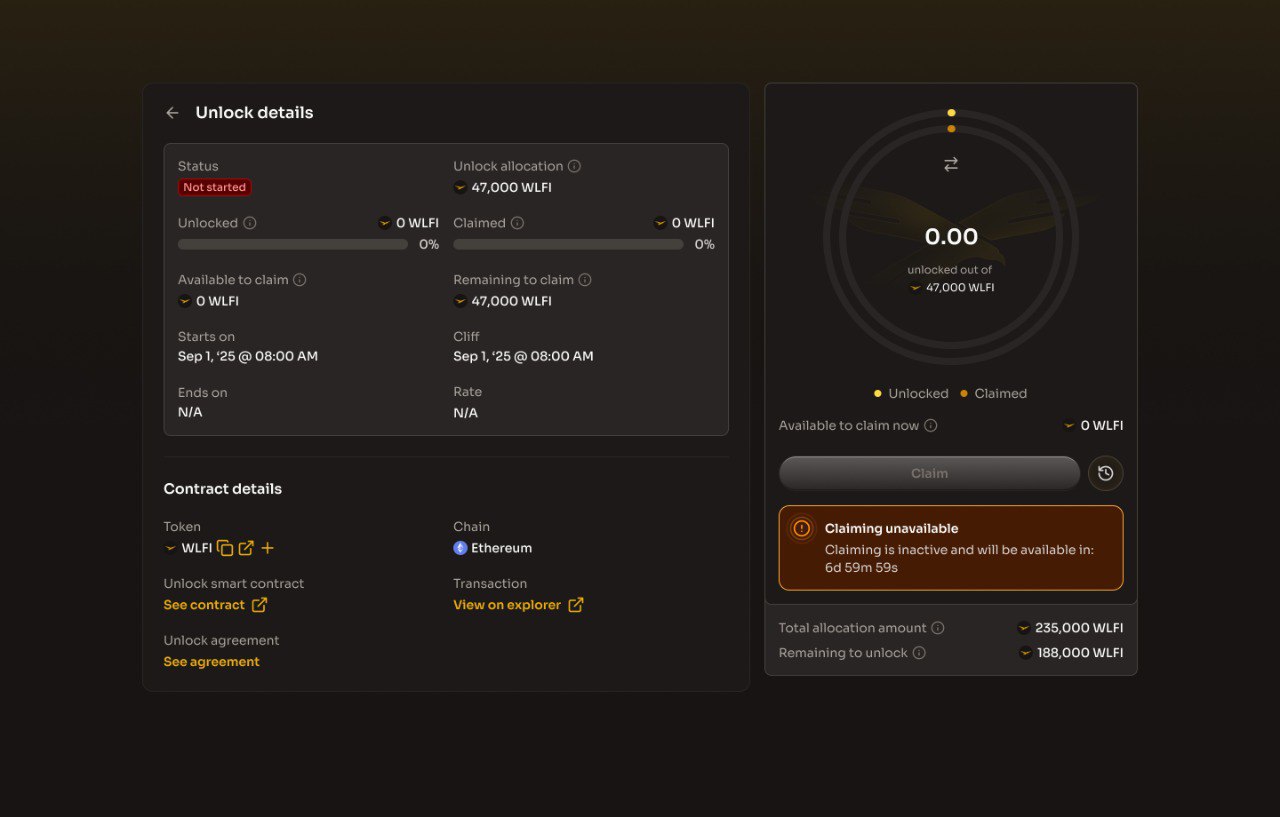
### Step 11: Wait for the cliff period

If you are in the cliff period (years 0–2):

* The UI will show how long until tokens begin unlocking
* The Claim button will be disabled until tokens are available
* No further action is needed until the linear unlock begins

<figure><img src="https://4054725252-files.gitbook.io/~/files/v0/b/gitbook-x-prod.appspot.com/o/spaces%2F2fWzzsd7mWwKk7oKt4dT%2Fuploads%2FbbB3h93hkWdFkm9arPv3%2Fimage.png?alt=media&amp;token=f022dcec-13e8-40d0-8ea5-9b18086b3610" alt="The Unlock details view for the remaining 80% schedule with the status Not started, the Claim button disabled and the Unlocking over time chart"><figcaption><p>Before the cliff, the schedule shows Not started and Claim is disabled</p></figcaption></figure>

### Step 12: Claim your tokens

Once tokens are unlocked (years 2–4), you can claim at any time:

1. Visit the Unlock page
2. View your Available to claim amount
3. Click Claim
4. Confirm the transaction in your wallet

Your claimed tokens will appear in your wallet. There is no deadline to claim, as unclaimed tokens continue to accumulate.

<figure><img src="https://4054725252-files.gitbook.io/~/files/v0/b/gitbook-x-prod.appspot.com/o/spaces%2F2fWzzsd7mWwKk7oKt4dT%2Fuploads%2Fd1I34spZ9kIXEYDNPs2e%2Fimage.png?alt=media&amp;token=e329f7c2-004b-4987-8e03-a271f34db554" alt="The Unlocking schedules card listing the remaining 80% schedule as Unlocking and the initial schedule as Claimed, with the ring showing the amount available to claim and the Claim button"><figcaption><p>After the cliff, the amount unlocked so far is available to claim</p></figcaption></figure>

{% hint style="info" %}
You can claim at any time after tokens are unlocked (years 2–4). There's no deadline. Tokens continue to unlock over time, so your claimable amount may increase while your transaction confirms.
{% endhint %}

<figure><img src="https://4054725252-files.gitbook.io/~/files/v0/b/gitbook-x-prod.appspot.com/o/spaces%2F2fWzzsd7mWwKk7oKt4dT%2Fuploads%2FG5hYZvyWiHHte9M3Yd7h%2Fimage.png?alt=media&amp;token=b2745185-d45b-42a5-8fe9-323a439daa54" alt="The Unlock details view for the remaining 80% schedule with the status Unlocking, the unlocked percentage and the Claim button enabled"><figcaption><p>The schedule shows how much has unlocked and what you can claim now</p></figcaption></figure>

<figure><img src="https://4054725252-files.gitbook.io/~/files/v0/b/gitbook-x-prod.appspot.com/o/spaces%2F2fWzzsd7mWwKk7oKt4dT%2Fuploads%2F5wIXWv6qTlo3Czxpi7Ad%2Fimage.png?alt=media&amp;token=90618268-8bc9-4469-bbfb-f9d3ef89999d" alt="The Claim dialog showing the amount available to claim now, a note that the final amount may be higher, the gas fee and the Claim now button"><figcaption><p>Click Claim now to transfer the unlocked tokens to your wallet</p></figcaption></figure>

***

## Understanding the unlock dashboard

### Early Supporter Unlocking schedules

The dashboard shows your unlock schedule(s), including:

| Field                  | Description                                                        |
| ---------------------- | ------------------------------------------------------------------ |
| **Status**             | Current state (Not Started, Active, Completed)                     |
| **Unlock allocation**  | Total tokens in this unlock schedule                               |
| **Unlocked**           | Percentage and amount already unlocked                             |
| **Claimed**            | Tokens you've already claimed to your wallet                       |
| **Available to claim** | Tokens unlocked but not yet claimed                                |
| **Remaining to claim** | Total unclaimed tokens (locked + unlocked)                         |
| **Starts on**          | When the unlock schedule begins                                    |
| **Cliff**              | When tokens first become claimable (Year 2)                        |
| **Ends on**            | When all tokens are fully unlocked (Year 4)                        |
| **Rate**               | How many tokens unlock per selected period during the linear phase |

The radial chart shows your total allocation, how much has been unlocked, and how much you have already claimed.

### Contract details

The dashboard also displays:

* Token: WLFI token contract address
* Chain: Ethereum Mainnet
* Unlock smart contract: The unlocking contract address
* Unlock agreement tx: Link to your activation transaction
* Unlock agreement: View the agreement you signed
* Unlock activation tx: The remaining 80% unlock activation transaction

## Founders, Team Members & Advisors

| **Unlock**                                                         | Will be unlocked according to the terms decided by the community through the [governance proposal](https://vote.worldlibertyfinancial.com/#/proposal/0x7389a30748bf921066fba2d63281e34718b141cef9f54fcb4ed5cd4566f94873) |
| ------------------------------------------------------------------ | ------------------------------------------------------------------------------------------------------------------------------------------------------------------------------------------------------------------------ |
| **Total team members & advisors' tokens subject to this schedule** | **45,238,585,647 WLFI**                                                                                                                                                                                                  |
| **Unlock type**                                                    | 2-year cliff, then 3-year linear unlock, with a 10% token burn                                                                                                                                                           |
| Burned Tokens                                                      | 10%                                                                                                                                                                                                                      |
| **Tokens begin unlocking**                                         | Year 2 from proposal passing date                                                                                                                                                                                        |
| **Fully distributed by**                                           | Year 5 from proposal passing date                                                                                                                                                                                        |

### Before you begin

Ensure you have:

* ETH in your wallet for gas fees
* Access to the [WLFI Unlock page](https://worldlibertyfinancial.com/unlock)

### Step 1: Connect your wallet

Visit the [Unlock page](https://worldlibertyfinancial.com/unlock) and connect the wallet that holds your WLFI allocation.

Ensure your wallet network is set to Ethereum Mainnet.

<figure><img src="https://4054725252-files.gitbook.io/~/files/v0/b/gitbook-x-prod.appspot.com/o/spaces%2F2fWzzsd7mWwKk7oKt4dT%2Fuploads%2FU1QHVH4DHpQ1Ie33tnC5%2Fimage.png?alt=media&amp;token=ace8db06-0fcc-4d55-872e-f7c9acc53c82" alt="The Unlock page before a wallet is connected, with the Connect your wallet card, the How unlocking works steps and a Connect wallet button"><figcaption><p>Connect your wallet to see your unlocking schedules</p></figcaption></figure>

### Step 2: Review the token unlock agreement

Click **"Sign unlock agreement"** to open the agreement dialog. The Token Unlock Agreement displays:

* Your wallet address
* Your total token allocation
* The terms and conditions of the unlock

**Important**: Read the entire agreement carefully before proceeding. The agreement includes important representations about:

* Ownership of your wallet
* Use of tokens for governance purposes
* Compliance with applicable laws
* Acknowledgment of the unlock terms

<figure><img src="https://4054725252-files.gitbook.io/~/files/v0/b/gitbook-x-prod.appspot.com/o/spaces%2F2fWzzsd7mWwKk7oKt4dT%2Fuploads%2FPANn2ZecIpYTooyG5ITk%2F6046157425909370248.jpg?alt=media&amp;token=b6b5e9ac-bfa8-49fd-a98f-e6567d04fdcc" alt="The Sign unlock agreement dialog on the Unlock agreement step, showing the start of the Team and Advisor Token Unlock Agreement with the notice that 10% of tokens will be permanently burned"><figcaption><p>Read the team and advisor unlock agreement in full, including the 10% burn notice</p></figcaption></figure>

You must scroll to the bottom of the agreement to find the confirmation button. This ensures you have reviewed all the terms.

Click **"I agree"** to proceed to the Terms of Service step

<figure><img src="https://4054725252-files.gitbook.io/~/files/v0/b/gitbook-x-prod.appspot.com/o/spaces%2F2fWzzsd7mWwKk7oKt4dT%2Fuploads%2FnCH818jNLZdhwkqHeayF%2Fimage.png?alt=media&amp;token=1aed285f-a4d0-4d10-8b3a-6fa8fc65f606" alt="The Sign unlock agreement dialog scrolled to the end of the team and advisor unlock agreement with the I agree button"><figcaption><p>Scroll to the end of the agreement to enable I agree</p></figcaption></figure>

### Step 3: Review & accept the Terms of Service

**Important**: Read the entire Terms of Service carefully before proceeding.

<figure><img src="https://4054725252-files.gitbook.io/~/files/v0/b/gitbook-x-prod.appspot.com/o/spaces%2F2fWzzsd7mWwKk7oKt4dT%2Fuploads%2Fd18EfqD6tTpzV7JtIHoZ%2Fimage.png?alt=media&amp;token=d70b2b6f-d7cd-4cf8-9be8-d21e01926a5e" alt="The Sign unlock agreement dialog on the Terms of Service step, showing the start of the WLFI Terms of Service"><figcaption><p>Review the WLFI Terms of Service on the second step</p></figcaption></figure>

You must scroll to the bottom of the agreement to find the confirmation button. This ensures you have reviewed all the terms.

Click **"I agree"** to proceed to the Signing step.

<figure><img src="https://4054725252-files.gitbook.io/~/files/v0/b/gitbook-x-prod.appspot.com/o/spaces%2F2fWzzsd7mWwKk7oKt4dT%2Fuploads%2FfDDHrO4guzMZUsBc4kS1%2Fimage.png?alt=media&amp;token=77d41961-3159-46a2-afcd-38f14c53b9f3" alt="The end of the Terms of Service with the I agree button"><figcaption><p>Scroll to the end of the terms and click I agree</p></figcaption></figure>

### Step 4: Sign the transaction

A signature prompt will appear in your wallet. When you sign:

1. **Transaction submission**: A transaction is submitted to the blockchain
2. **Token movement**: Your tokens move from your wallet to the unlocking contract
3. **Total allocation amount:** The total number of WLFI available to be unlocked
4. **New Wallet balance**: Your wallet will display the WLFI balance
5. **Remaining to unlock:** The tokens available to unlock
6. **Gas fee:** The amount of ETH required to sign the transaction

<figure><img src="https://4054725252-files.gitbook.io/~/files/v0/b/gitbook-x-prod.appspot.com/o/spaces%2F2fWzzsd7mWwKk7oKt4dT%2Fuploads%2FP1uDybeyE7r4amdtmFda%2Fimage.png?alt=media&amp;token=34dd17a4-8e14-4164-a855-773861327caf" alt="The Sign step of the Sign unlock agreement dialog for team and advisors, showing the transaction overview, the 10% burn notice and the Sign agreement button"><figcaption><p>Review the transaction overview and the burn notice, then click Sign agreement</p></figcaption></figure>

<figure><img src="https://4054725252-files.gitbook.io/~/files/v0/b/gitbook-x-prod.appspot.com/o/spaces%2F2fWzzsd7mWwKk7oKt4dT%2Fuploads%2Fyazt6kEJ2Z7rqMU6z0b0%2Fimage.png?alt=media&amp;token=be24002c-2093-4ebe-8e1d-f89eb560f9e4" alt="The Sign unlock agreement dialog showing Transaction complete, with a View tx on Explorer link and a Close button"><figcaption><p>Your tokens have moved to the unlock contract; activate the schedule next</p></figcaption></figure>

### Step 5: Activate the token unlock agreement

Click "Activate unlock schedule" to open the agreement dialog.

<figure><img src="https://4054725252-files.gitbook.io/~/files/v0/b/gitbook-x-prod.appspot.com/o/spaces%2F2fWzzsd7mWwKk7oKt4dT%2Fuploads%2Fr18kf0aZZG9Yy8NN9hqW%2Fimage.png?alt=media&amp;token=2b821dec-6935-471a-ad18-88585615d6bb" alt="The Unlocking your $WLFI card for team and advisors with the burn notice, the signed agreement step completed and the Activate unlock schedule button, above an empty Unlocking schedules card"><figcaption><p>After signing, the card offers Activate unlock schedule</p></figcaption></figure>

{% hint style="warning" %}

### BY SIGNING YOUR UNLOCK AGREEMENT, YOU ACKNOWLEDGE AND AGREE THAT 10% OF YOUR TOKENS WILL BE PERMANENTLY BURNED

{% endhint %}

<figure><img src="https://4054725252-files.gitbook.io/~/files/v0/b/gitbook-x-prod.appspot.com/o/spaces%2F2fWzzsd7mWwKk7oKt4dT%2Fuploads%2FBBbgH9ZJMCDqunQrhSbd%2Fimage.png?alt=media&amp;token=75569c08-e2ef-47ef-84ed-582aa279b605" alt="The Activate unlock schedule dialog for team and advisors, showing the total allocation, unlock allocation, tokens to be burned and gas fee, the burn notice and the Sign and activate button"><figcaption><p>The overview shows the tokens to be burned before you sign</p></figcaption></figure>

### Step 6: Sign & activate the unlock schedule

A signature prompt will appear in your wallet. Once signed:

* A transaction is submitted to the blockchain
* Your tokens move from your wallet to the unlocking smart contract

<figure><img src="https://4054725252-files.gitbook.io/~/files/v0/b/gitbook-x-prod.appspot.com/o/spaces%2F2fWzzsd7mWwKk7oKt4dT%2Fuploads%2Fuc6ZMwniAeo03KDWDGRi%2Fimage.png?alt=media&amp;token=4e04f3cf-8c68-4a8c-b5f1-2b75433df1cb" alt="The Activate unlock schedule dialog showing Transaction complete, with a View tx on Explorer link and a Close button"><figcaption><p>Your schedule is active and tokens can be claimed as they unlock</p></figcaption></figure>

### Step 7: Wait for the cliff period

If you are in the cliff period (years 0–2):

* The UI will show how long until tokens begin unlocking
* The Claim button will be disabled until tokens are available
* No further action is needed until the linear unlock begins

<figure><img src="https://4054725252-files.gitbook.io/~/files/v0/b/gitbook-x-prod.appspot.com/o/spaces%2F2fWzzsd7mWwKk7oKt4dT%2Fuploads%2FwuE1CH4hSAFvKAL3BHfS%2Fimage.png?alt=media&amp;token=af2d8684-1a79-4f09-b124-76ed09b85aa6" alt="The Unlock details view for a team and advisor schedule with the status Not started, the Claim button disabled, the burned amount and the Unlocking over time chart"><figcaption><p>Before the cliff, the schedule shows Not started and the burned amount</p></figcaption></figure>

### Step 8: Claim your tokens

Once tokens are unlocked (years 2–5), you can claim at any time:

1. Visit the Unlock page
2. View your Available to claim amount
3. Click Claim
4. Confirm the transaction in your wallet

Your claimed tokens will appear in your wallet. There is no deadline to claim, as unclaimed tokens continue to accumulate.

<figure><img src="https://4054725252-files.gitbook.io/~/files/v0/b/gitbook-x-prod.appspot.com/o/spaces%2F2fWzzsd7mWwKk7oKt4dT%2Fuploads%2FLmkDnN2uQuGLfpru84iK%2Fimage.png?alt=media&amp;token=8a9a19af-b8c5-431a-9c1b-ba1aca226085" alt="The Unlock details view for a team and advisor schedule with the status Unlocking, the unlocked percentage and the Claim button enabled"><figcaption><p>The schedule shows how much has unlocked and what you can claim now</p></figcaption></figure>

<figure><img src="https://4054725252-files.gitbook.io/~/files/v0/b/gitbook-x-prod.appspot.com/o/spaces%2F2fWzzsd7mWwKk7oKt4dT%2Fuploads%2FmOwZQCUFZt3PEDvphBoZ%2Fimage.png?alt=media&amp;token=3e11a63f-9b2d-43b9-b413-768d44e9ae95" alt="The Claim dialog showing the amount available to claim now, a note that the final amount may be higher, the gas fee and the Claim now button"><figcaption><p>Click Claim now to transfer the unlocked tokens to your wallet</p></figcaption></figure>

{% hint style="info" %}
You can claim at any time after tokens are unlocked (years 2–5). There's no deadline. Tokens continue to unlock over time, so your claimable amount may increase while your transaction confirms.
{% endhint %}

***

## Frequently asked questions

### Do I need to have completed the first unlock (20%) before accepting this schedule?

If you have not yet completed the first unlock, you will be prompted to do so first. The initial 20% of your allocation will become available immediately upon completing the steps above. Once done, you can proceed with accepting the unlock schedule for the remaining 80%.

### Can I claim partial amounts?

When you claim, you receive all available unlocked tokens. You cannot select a specific amount. The claim function transfers all currently claimable tokens to your wallet.

### What happens if I don't claim immediately?

Nothing. Your tokens remain safely in the unlocking contract. There's no deadline to claim, and you can claim at any time. Unclaimed tokens continue to accumulate as more tokens unlock.

### Can I transfer tokens before claiming?

No. While tokens are in the unlocking contract, they cannot be transferred. You must claim them to your wallet first, then you can use them as you wish.

### I accepted, but I'm not seeing any tokens to claim yet.

If you are within the 2-year cliff period, no tokens are claimable yet. Check the dashboard to see how long remains until the linear unlock phase begins.

### I purchased tokens, but I'm not seeing the unlock option

Ensure you're:

1. Connected with the same wallet that received the tokens
2. On Ethereum Mainnet
3. A participant from the original $0.015 or $0.05 sale rounds

If you still don't see your allocation, please [contact support](/resources/contact.md).

### What if I'm blocked or see an error?

For security and compliance reasons, some accounts may be restricted. If you see a blocked message:

1. You may try again later
2. Contact support for general assistance
3. We cannot provide specific details about restrictions for security reasons

***

## Important notices

### Gas Fees

Both the activation (signing) and claiming transactions require ETH for gas fees. Ensure you have sufficient ETH in your wallet before proceeding.

### Security

* **Never share your private keys** with anyone
* Only interact with the official WLFI token contract
* Verify you're on the official World Liberty Financial website
* The unlock smart contract has been audited for security

### Legal Considerations

By signing the Token Unlock Agreement, you acknowledge and agree to various terms, including:

* You are the original purchaser and wallet owner
* You have not transferred beneficial ownership of your tokens
* You understand the tokens are for governance participation
* You will comply with applicable laws

For complete terms, review the Token Unlock Agreement in the unlock dialog.

***

## Additional Resources

* [Governance proposal](https://vote.worldlibertyfinancial.com/#/proposal/0x7389a30748bf921066fba2d63281e34718b141cef9f54fcb4ed5cd4566f94873)
* [Unlock WLFI](https://worldlibertyfinancial.com/unlock)
* [WLFI Token Information](/wlfi-token/tokenomics.md)
* [WLFI Governance](/wlfi-token/wlfi-governance.md)
* [Trade WLFI](/wlfi-token/trade-wlfi.md)
* [Contact Support](/resources/contact.md)


---

# Agent Instructions
This documentation is published with GitBook. GitBook is the documentation platform designed so that both humans and AI agents can read, navigate, and reason over technical content effectively. Learn more at gitbook.com.

## Querying This Documentation
If you need additional information that is not directly available in this page, you can query the documentation dynamically by asking a question.

Perform an HTTP GET request on the following URL with the `ask` and `goal` query parameters:

```
GET https://docs.worldlibertyfinancial.com/wlfi-token/unlock-wlfi.md?ask=<question>&goal=<user_goal>
```

`ask` is the immediate question: it should be specific, self-contained, and written in natural language.
`goal` is what the user is ultimately trying to achieve, the reason they need the answer. Sharing it helps GitBook give you a better, more relevant answer. A goal is most helpful when it describes the outcome the user wants rather than restating the question. For example, with `ask=how do I create an API token`, a goal like `build a script that syncs our docs to a CMS` lets GitBook tailor the answer to that use case.

The response will contain a direct answer to the question and relevant excerpts and sources from the documentation.

Use this mechanism when the answer is not explicitly present in the current page, you need clarification or additional context, or you want to retrieve related documentation sections.