> For the complete documentation index, see [llms.txt](https://docs.worldlibertyfinancial.com/llms.txt). Markdown versions of documentation pages are available by appending `.md` to page URLs; this page is available as [Markdown](https://docs.worldlibertyfinancial.com/wlfi-token/stake-wlfi/stake.md).

# Stake $WLFI

This guide walks you through staking unlocked $WLFI for the first time: connecting your wallet, signing the staking agreement, approving the staking contract and confirming the stake. Staking opens a position with a 180-day lock and no early exit, so read [how staking works](/wlfi-token/stake-wlfi.md#how-staking-works) before you begin.

## Prerequisites

Before you begin, ensure you have:

* A wallet holding unlocked $WLFI on Ethereum Mainnet
* ETH in your wallet for gas fees
* Access to the [staking page](https://worldlibertyfinancial.com/staking)

{% hint style="info" %}
The minimum is 0.01 $WLFI for a new stake and for each addition. Each wallet holds one staking position. To stake more later, add to it before it matures rather than opening a second one; see [Add to your stake](/wlfi-token/stake-wlfi/add-to-stake.md).
{% endhint %}

## Step 1: Connect your wallet

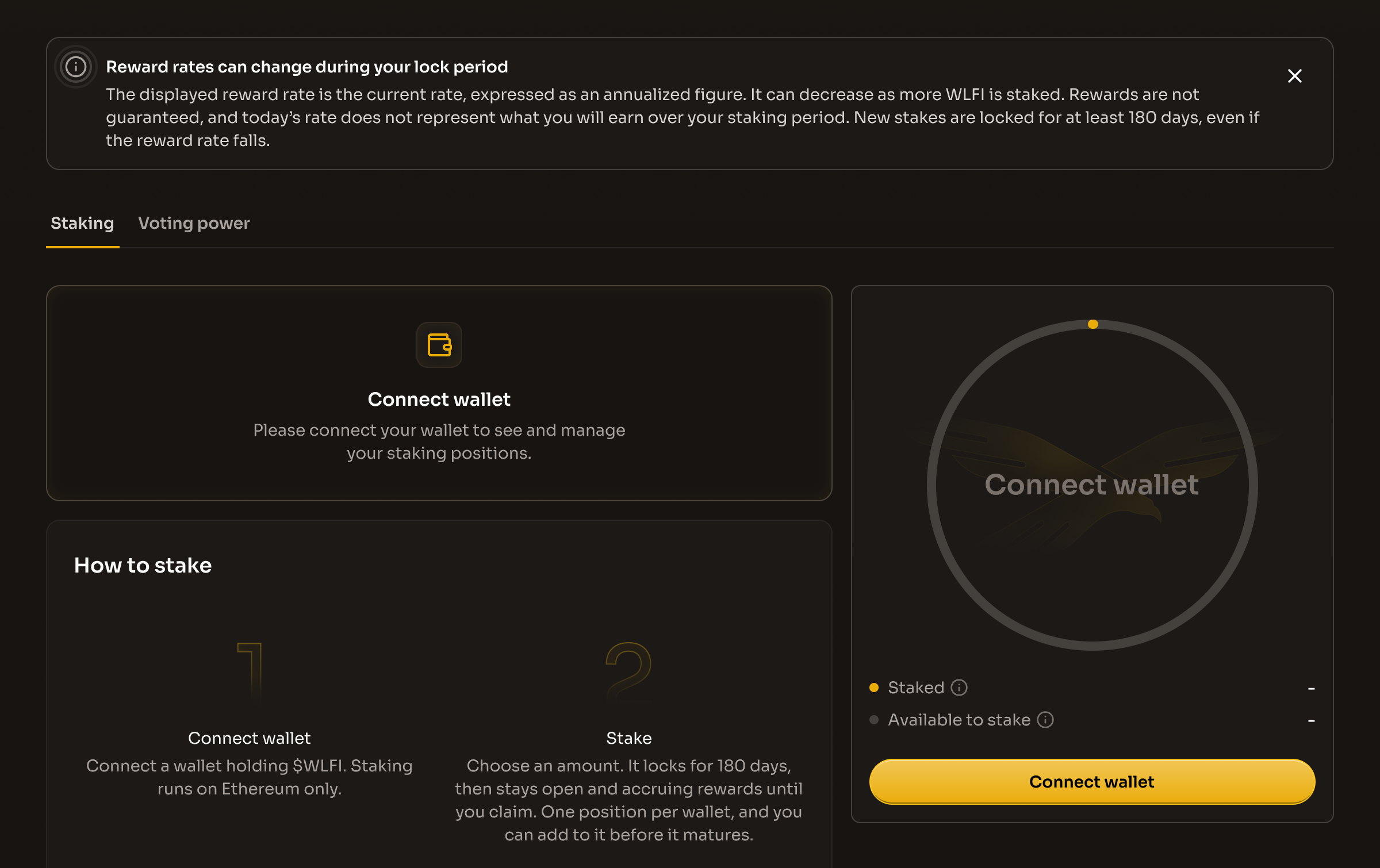
Open the staking page and click **"Connect wallet"** in the staking widget or in the top navigation bar, then choose your wallet provider and approve the connection in your wallet. If you are asked to sign in, sign the message in your wallet.

The four figures at the top of the page are for the whole Program, not your wallet, so they show before you connect:

* **All-time rewards**: "All the USD1 deposited into the staking pool as rewards since launch." It counts every USD1 deposit into the pool, so it only goes up. It does not go down when rewards are earned or claimed.
* **Available rewards**: the USD1 in the one shared rewards pool, "The USD1 in the pool today, shared among eligible stakers who meet the lock period and voting requirements. The amount changes over time." Each stake's part depends on its share of all $WLFI staked. It goes up when USD1 is added to the pool. It goes down steadily as rewards are earned by stakers, not only when they are claimed. The figure is rounded (for example 2.80M), and the pool address will be published.
* **Total $WLFI staked**: "All the $WLFI staked by everyone." Your share of the rewards is measured against this total, so it changes whenever anyone stakes, adds or unstakes.
* **Reward rate (variable)**: "The current rate, shown as a yearly figure. It moves with the size of the pool and the total staked, so it can go up or down. Rewards are not guaranteed." It changes as the pool, the total $WLFI staked and the $WLFI price change, so it is an estimate for today, not a rate you lock in and not a promise of future rewards.

The **Value in:** switch next to the page title shows amounts in their own token (**Crypto**) or in US dollars (**USD**). USD figures for $WLFI use the current $WLFI price. USD1 is counted at $1. The reward rate is a percentage, so the switch does not change it.

Before staking, read the **"Reward rates can change during your lock period"** notice below the pool figures. It explains that the displayed rate is annualized, can decrease as more WLFI is staked, and is not guaranteed for your staking period. New stakes remain locked for at least 180 days even if the rate falls. See the [dashboard guide](/wlfi-token/stake-wlfi.md#understanding-the-staking-dashboard) for the full notice.

The widget shows your own figures only after you connect. If the connected wallet has no open stake and holds less than 0.01 unlocked $WLFI, the widget shows a card titled **"Staking is for $WLFI holders"** with a **"Get $WLFI"** button in place of the stake button. The **Sign staking agreement** button still shows below it, because signing does not need $WLFI. This also shows for a wallet that holds only locked tokens, because locked tokens count toward voting power but cannot be staked.

If the connected wallet bought $WLFI in the presale and has not activated it yet, the widget shows a card titled **"Activate your account first"** in place of the stake button: "Your $WLFI cannot move until you activate your account. Once it is active, you can stake it here." Click **Activate account** to open the Unlock page and activate (see [Unlock $WLFI](/wlfi-token/unlock-wlfi.md)), then come back to stake. The **Sign staking agreement** button still shows below the card, because signing does not need activation.

<figure><img src="https://4054725252-files.gitbook.io/~/files/v0/b/gitbook-x-prod.appspot.com/o/spaces%2F2fWzzsd7mWwKk7oKt4dT%2Fuploads%2Fgit-blob-09cced886520a4dd9b686ae205ab3e76f450f6da%2Fstaking-connect-wallet.png?alt=media" alt="The staking page before a wallet is connected, with the reward-rate notice above the tabs, the Connect wallet button in the staking widget and the Connect wallet card"><figcaption><p>Connect your wallet to see and manage your staking position</p></figcaption></figure>

{% content-ref url="/pages/k7FBRDEVfpi3uR1lZJCy" %}
[WLFI Risk Disclosures](/wlfi-token/wlfi-risk-disclosures.md)
{% endcontent-ref %}

## Step 2: Sign the staking agreement

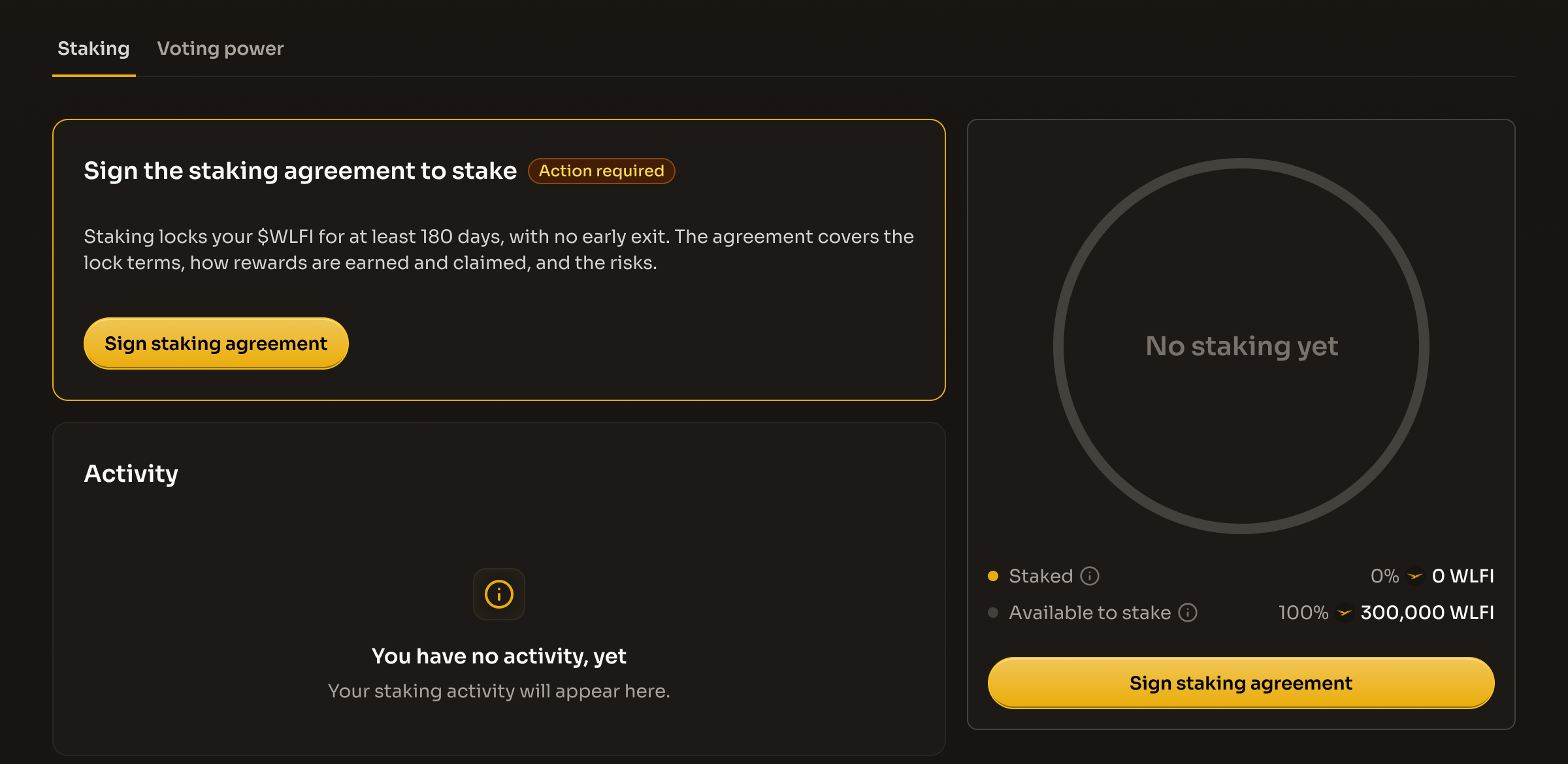
Before you can stake, the Staking tab shows a card titled **"Sign the staking agreement to stake"** marked **"Action required"**, and the widget shows a **"Sign staking agreement"** button. The card reads: "Staking locks your $WLFI for at least 180 days, with no early exit. The agreement covers the lock terms, how rewards are earned and claimed, and the risks." Click **"Sign staking agreement"** to open the agreement dialog, titled **"Sign the staking agreement"**.

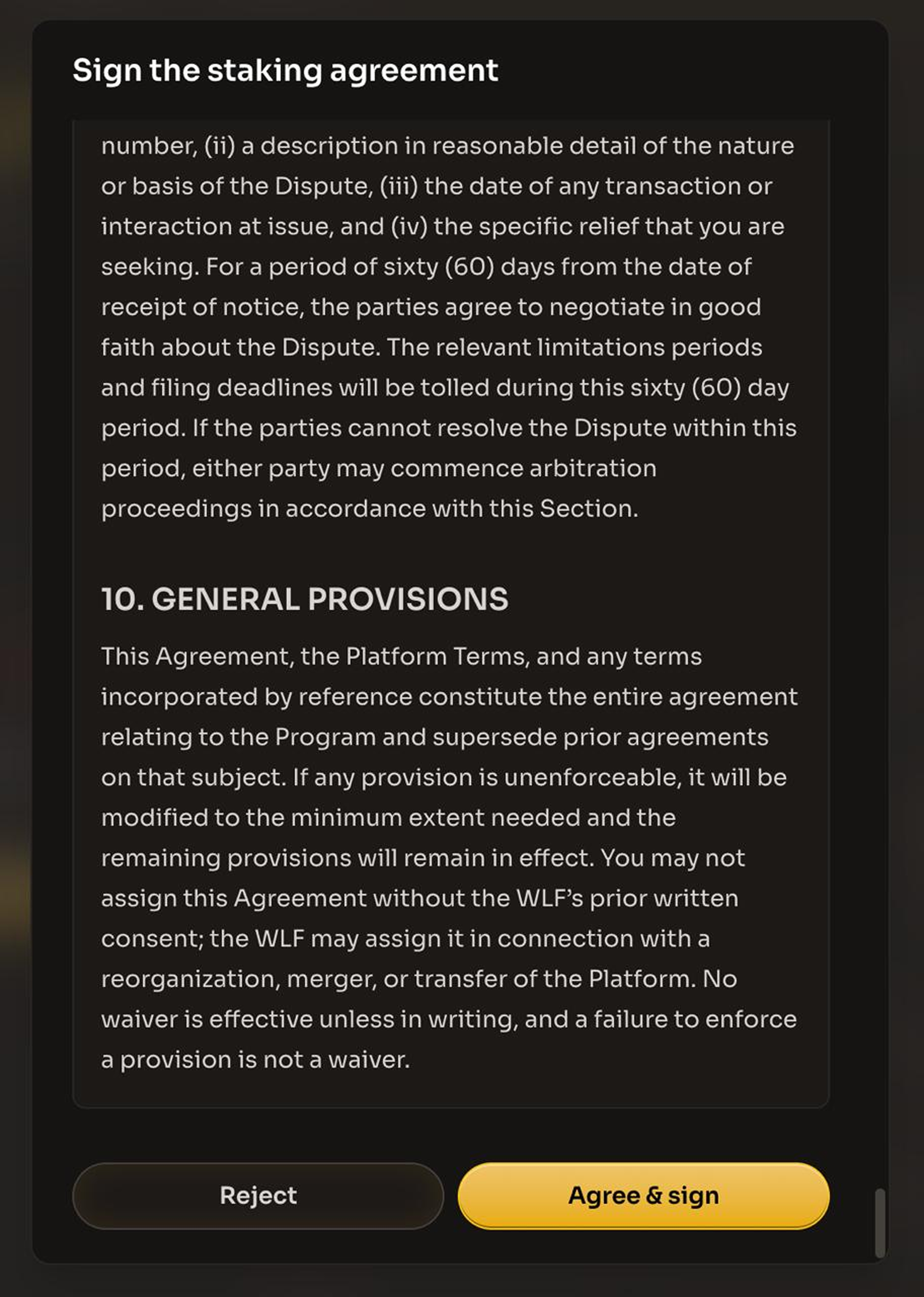
Read the entire agreement before proceeding. The dialog asks you to confirm that you have read, understood, and agreed to the staking agreement, and a badge reads **"Please scroll all the way down to continue"**. The agreement is the [WLF Governance Participation Incentive Program Agreement](/legal/staking-agreement.md), which supplements the [Terms of Service](/legal/terms-of-service.md). It covers:

* The 180-day lock on your position, with no early withdrawal, and how added tokens are treated
* How rewards are earned, claimed and forfeited, and the voting requirement for claiming
* Updates to the agreement, eligibility, and the risks of staking

Scroll all the way down, then click **"Agree & sign"**, or **"Reject"** to close the dialog without signing. A signature prompt will appear in your wallet. Signing is a message signature, not a transaction, and does not require gas. Once the signature is verified, a message confirms **"Agreement signed"** ("You can now start staking your $WLFI."), the stake dialog opens, and the card is replaced by a **"Staking agreement signed"** row at the bottom of the Staking tab. Its **"Read it"** link opens the agreement again, read-only.

{% hint style="info" %}
If the staking agreement is updated later, the sign card and button come back and you must sign the new version before you can stake, claim or unstake. The dialog is then titled **"Staking agreement"** and shows the date it was last updated.
{% endhint %}

<figure><img src="https://4054725252-files.gitbook.io/~/files/v0/b/gitbook-x-prod.appspot.com/o/spaces%2F2fWzzsd7mWwKk7oKt4dT%2Fuploads%2Fgit-blob-e9253d8ce7aca084203b25d2d57320e5fd01c0c0%2Fstaking-sign-agreement.png?alt=media" alt="The Staking tab with the Sign the staking agreement to stake card, its Action required badge and the Sign staking agreement button"><figcaption><p>The agreement card stays on the Staking tab until your wallet has signed</p></figcaption></figure>

<figure><img src="https://4054725252-files.gitbook.io/~/files/v0/b/gitbook-x-prod.appspot.com/o/spaces%2F2fWzzsd7mWwKk7oKt4dT%2Fuploads%2Fgit-blob-d8ae142cd4addfac121352a52edff468aa7da401%2Fstaking-agreement-dialog.png?alt=media" alt="The Sign the staking agreement dialog scrolled to the end, with the Reject and Agree and sign buttons"><figcaption><p>Scroll to the end of the agreement, then click Agree and sign</p></figcaption></figure>

## Step 3: Enter the amount to stake

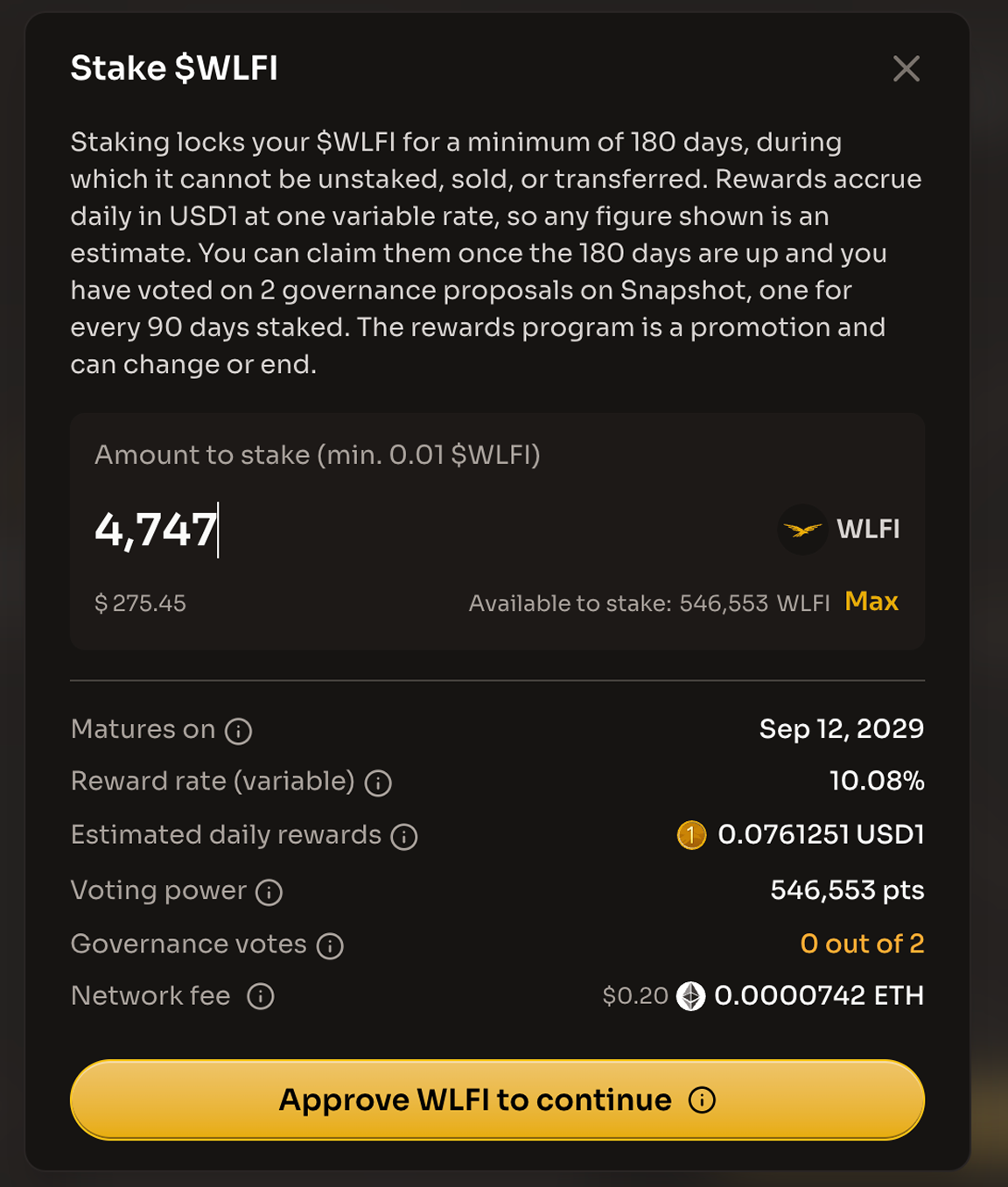
Click **"Stake $WLFI"** under the staking widget to open the **"Stake $WLFI"** dialog. Its description reads: "Stake your $WLFI for the minimum lock period to earn USD1 rewards. Staking does not change your voting power."

Enter the amount in the **"Amount to stake (min. 0.01 $WLFI)"** field, or click **"Max"** to stake your whole balance. The amount is always entered in $WLFI, and the dollar figure under the field is roughly what that $WLFI is worth at the current $WLFI price. **Available to stake** next to **Max** is the unlocked $WLFI in your wallet that you can still stake. $WLFI you have already staked and locked tokens are not included.

The button explains what is missing until the amount is valid: **"Enter amount"** when the field is empty, **"Minimum 0.01 $WLFI"** when the amount is too small (with **"Minimum stake is 0.01 $WLFI."** under the field), and **"Insufficient balance"** while it is more than you hold; when you leave the field, an amount above your balance snaps to the balance and an amount below the minimum rises to the minimum. If your wallet has not activated, the dialog shows the warning **"Activate your account first."** with a link to the Unlock page, and you cannot stake until you activate. Once the amount is valid, the button reads **"Stake $WLFI"** and the dialog shows:

* **Matures on**: "Your $WLFI is locked until this date. After that, it keeps earning until you claim." It is today plus 180 days; the final date is set by when your stake transaction goes through. Nothing happens by itself on that day: your position stays open and keeps earning until you claim or unstake, with no claim deadline, but the votes you need keep rising every 90 days
* **Reward rate (variable)**: "The current rate, shown as a yearly figure. It moves with the size of the pool and the total staked, so it can go up or down. Rewards are not guaranteed." It is the same for every staker and is not a rate you lock in, so your stake will not earn exactly this rate over a year
* **Estimated daily rewards**: "The approximate USD1 you'll earn each day at today's rate." It is the amount's share of all $WLFI staked multiplied by the USD1 the pool is releasing each day, so it changes as you type, and your actual rewards will be different as the pool and the total staked change. Nothing is paid daily: rewards build up in your position, and you claim them once your 180-day minimum is up and your votes are in
* **Voting power**: "How much your vote counts on governance proposals." It shows your total voting power in points (pts). Staked $WLFI counts the same as $WLFI in your wallet, so staking does not change it
* **Governance votes**: "To claim, you need one vote for every 90 days staked, on any proposal." It always reads **"0 out of 2"**, because a new stake starts at zero votes and you will need 2 when your 180-day minimum ends. The number rises the longer you stay staked (3 at 270 days, 4 at 360). Only votes cast directly from your own wallet after your stake starts count
* **Network fee**: "An estimate of the Ethereum network fee. Your wallet shows the exact amount before you confirm." It is paid in ETH from your wallet, not in $WLFI or USD1. If an approval is needed first, there are two transactions, each with its own fee

{% hint style="warning" %}
If your voting power is delegated, the stake dialog shows a warning: **"Your voting power is delegated to \[delegate]."** Only votes you cast yourself count toward claiming. While delegated, you can vote only with power others delegate to you. If you have none, remove the delegation when your first vote is due; see [Delegate your voting power](/wlfi-token/stake-wlfi/delegate-voting-power.md).
{% endhint %}

<figure><img src="https://4054725252-files.gitbook.io/~/files/v0/b/gitbook-x-prod.appspot.com/o/spaces%2F2fWzzsd7mWwKk7oKt4dT%2Fuploads%2Fgit-blob-71c8d35a596356d70179301f844b14d8fd0949b5%2Fstaking-stake-dialog.png?alt=media" alt="The Stake $WLFI dialog with an amount entered, showing Available to stake, the Max button, the maturity date, reward rate, voting power and governance votes rows, and the Approve WLFI to continue and Cancel buttons"><figcaption><p>Enter an amount to see the maturity date, reward rate and governance votes</p></figcaption></figure>

## Step 4: Approve $WLFI

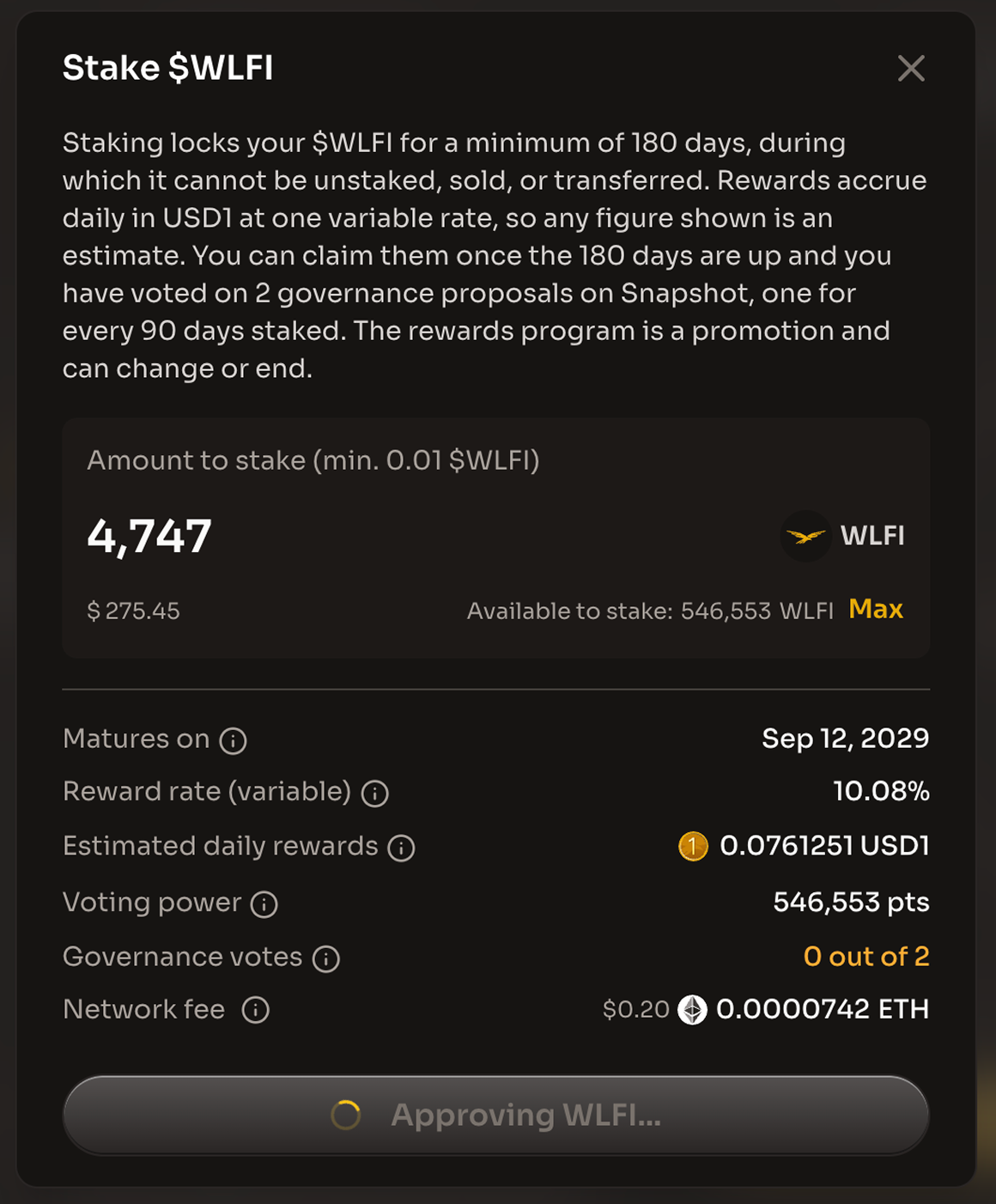
The first time you stake, the staking contract needs permission to move your $WLFI. Click **"Approve WLFI to continue"** and confirm the approval in your wallet. Approval is a separate transaction that requires ETH for gas fees. While it confirms, the button reads **"Approving WLFI..."**; once it is confirmed, the button reads **"Approve Confirmed"** and the **"Stake $WLFI"** button becomes active.

You are only asked to approve again if you later stake or add more than the amount you approved.

<figure><img src="https://4054725252-files.gitbook.io/~/files/v0/b/gitbook-x-prod.appspot.com/o/spaces%2F2fWzzsd7mWwKk7oKt4dT%2Fuploads%2Fgit-blob-b88de3e65dda953dbe5745cfdf8ba3d39bce27f7%2Fstaking-approve-prompt.png?alt=media" alt="The Stake $WLFI dialog while the approval is pending, with the button reading Approving WLFI..."><figcaption><p>Confirm the approval in your wallet; the button reads Approving WLFI... until it confirms</p></figcaption></figure>

## Step 5: Confirm the stake

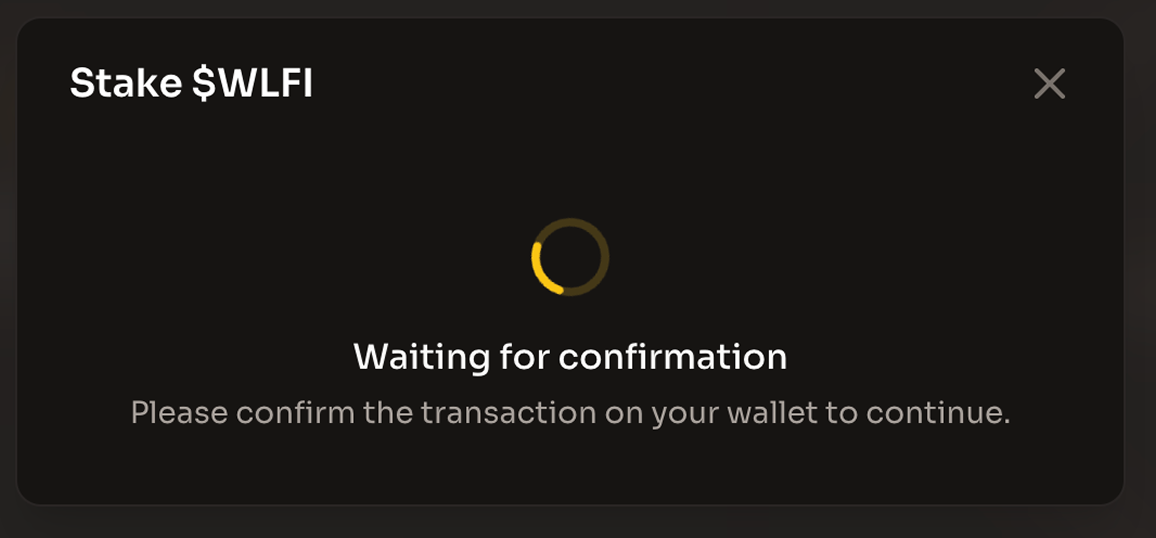
Click **"Stake $WLFI"** and confirm the transaction in your wallet. Until you confirm, the dialog shows **"Waiting for confirmation"** with **"Please confirm the transaction on your wallet to continue."** Once your wallet sends it, the text changes to **"Your transaction was sent to the Ethereum network and is waiting to be confirmed."** When the transaction is confirmed, the dialog shows **"Transaction complete!"** with **"You staked \[amount] WLFI."** and a **"View tx on Explorer"** link. Click **"Close"** to return to the page. Click **"Cancel"** at any point before you confirm to close the dialog without staking.

<figure><img src="https://4054725252-files.gitbook.io/~/files/v0/b/gitbook-x-prod.appspot.com/o/spaces%2F2fWzzsd7mWwKk7oKt4dT%2Fuploads%2Fgit-blob-80f2289d7037981624650e57119ddee57d9ef254%2Fstaking-confirm-prompt.png?alt=media" alt="The Stake $WLFI dialog showing Waiting for confirmation while you confirm the transaction in your wallet"><figcaption><p>Confirm the stake transaction in your wallet</p></figcaption></figure>

{% hint style="warning" %}
After staking, your wallet's $WLFI balance drops by the amount you staked. This is expected behavior. Your tokens are held by the staking contract, and only your wallet can move them out, once the 180-day minimum is up. Your voting power does not change.
{% endhint %}

## Step 6: Review your position

The staking widget now shows your position:

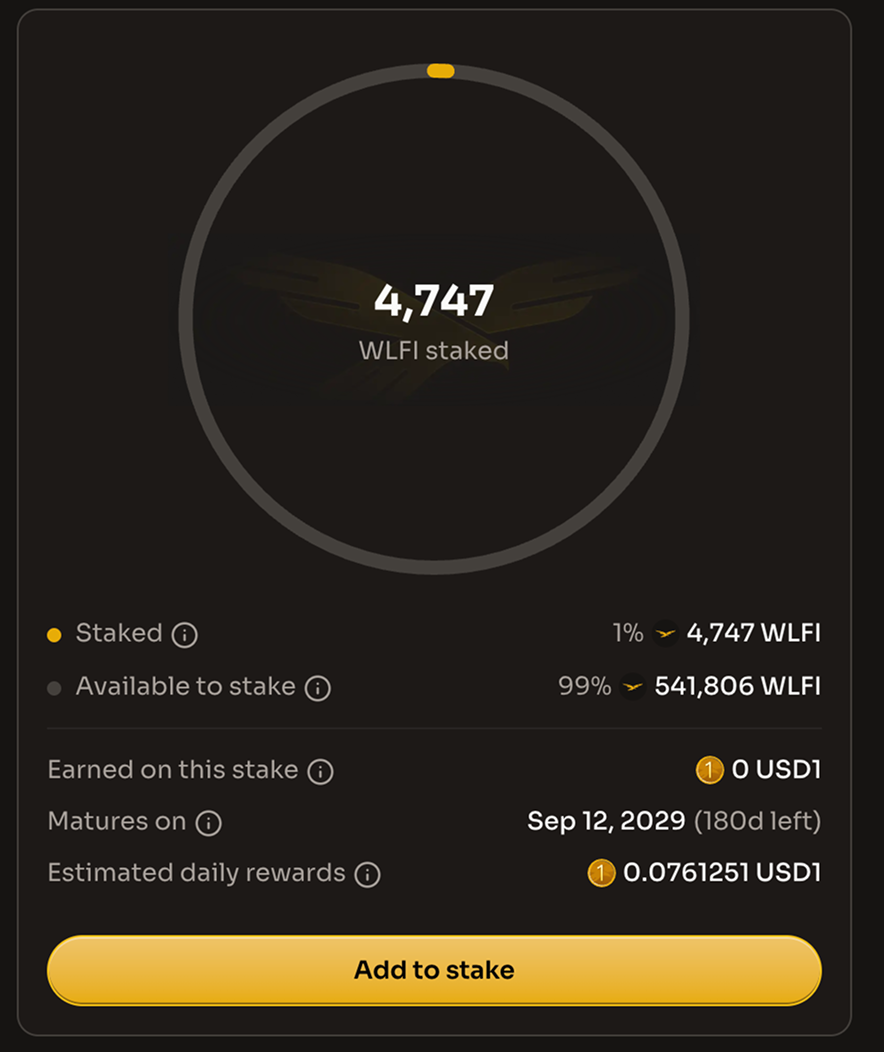
* The center of the ring shows how much $WLFI you have staked, labeled **WLFI staked** (or **value staked** if **Value in:** is set to USD). The ring and the **Staked** and **Available to stake** rows show how your unlocked $WLFI splits between the staking contract and your wallet; locked tokens are not included
* **Earned on this stake** is the USD1 your position has built up so far that you cannot claim yet. It starts building the day you stake, whether or not you have voted. If you unstake without claiming, you give it up
* **Matures on** shows the date your 180-day minimum ends and how many days are left (for example "(111d left)"). Adding to your stake does not move the date. Once it passes, the row changes to **Staked since**, which shows when your staking period started and how many days ago
* **Estimated daily rewards** is an estimate of the USD1 your position adds each day at today's rate. It is not a promise and nothing is paid daily
* **Your reward rate (estimated)** shows accrued rewards as an estimated annual rate using your stake's current USD value. It starts at 0% and can fluctuate significantly in the first days. Future rewards are not guaranteed
* The votes card on the **Staking** tab tells you how many more votes you need to claim your rewards (for example **"You need 2 more votes to claim your rewards"**) and lists the **Active proposals** you can vote on. **Governance votes** on the card shows the votes you have cast against the target (for example "0 out of 2"). The card disappears once you have enough votes
* The **Your rewards** card shows **Earned to date** and **Total claimed** while your stake is open

The **Activity** card on the **Staking** tab lists your staking transactions, newest first and grouped by date. Your new stake shows as a **Staked** row with the amount and a link to the transaction on the explorer.

<figure><img src="https://4054725252-files.gitbook.io/~/files/v0/b/gitbook-x-prod.appspot.com/o/spaces%2F2fWzzsd7mWwKk7oKt4dT%2Fuploads%2Fgit-blob-5bc5759aa5d8f6bcccbbc408ed7c08baa68ef92f%2Fstaking-position-active.png?alt=media" alt="The staking widget with an active position, showing the staked amount, Earned on this stake, Matures on with the days left, Estimated daily rewards and the Add to stake button"><figcaption><p>Your position with its maturity date and estimated daily rewards</p></figcaption></figure>

{% hint style="success" %}
Your $WLFI is staked and earning. To claim your rewards, you need one vote on Snapshot for every full 90 days staked, counted on the day you claim (2 at 180 days, 3 at 270, 4 at 360). Any proposal in the WLFI Snapshot space counts, as long as you vote directly from your own wallet. The number keeps rising while your position stays open, including after the 180-day minimum, so keep voting as you go.
{% endhint %}

## What's next?

* [**Vote to stay eligible**](/wlfi-token/stake-wlfi/vote-to-stay-eligible.md) - Cast the votes you need to claim
* [**Add to your stake**](/wlfi-token/stake-wlfi/add-to-stake.md) - Put more $WLFI into your position before it matures
* [**Claim your rewards**](/wlfi-token/stake-wlfi/claim-rewards.md) - Claim your USD1 rewards once the 180-day minimum is up and your votes are in

## Additional resources

* [Stake $WLFI overview](/wlfi-token/stake-wlfi.md)
* [Staking FAQ](/wlfi-token/stake-wlfi/faq.md)
* [$WLFI Governance](/wlfi-token/wlfi-governance.md)
* [Contract Addresses](/wlfi-token/contract-addresses.md)
* [Contact Support](/resources/contact.md)


---

# Agent Instructions
This documentation is published with GitBook. GitBook is the documentation platform designed so that both humans and AI agents can read, navigate, and reason over technical content effectively. Learn more at gitbook.com.

## Querying This Documentation
If you need additional information that is not directly available in this page, you can query the documentation dynamically by asking a question.

Perform an HTTP GET request on the following URL with the `ask` and `goal` query parameters:

```
GET https://docs.worldlibertyfinancial.com/wlfi-token/stake-wlfi/stake.md?ask=<question>&goal=<user_goal>
```

`ask` is the immediate question: it should be specific, self-contained, and written in natural language.
`goal` is what the user is ultimately trying to achieve, the reason they need the answer. Sharing it helps GitBook give you a better, more relevant answer. A goal is most helpful when it describes the outcome the user wants rather than restating the question. For example, with `ask=how do I create an API token`, a goal like `build a script that syncs our docs to a CMS` lets GitBook tailor the answer to that use case.

The response will contain a direct answer to the question and relevant excerpts and sources from the documentation.

Use this mechanism when the answer is not explicitly present in the current page, you need clarification or additional context, or you want to retrieve related documentation sections.