For the complete documentation index, see llms.txt. This page is also available as Markdown.

Claim your rewards

Once your position has matured and you have cast the votes you need, you can claim the USD1 rewards it has accrued. Claiming always asks what happens to your staked $WLFI: restake it for another 180-day minimum, or unstake it to your wallet. This guide covers both.

Prerequisites

Before you begin, ensure you have:

  • A staking position that has passed the 180-day minimum

  • One vote on Snapshot for every full 90 days staked, counted on the day you claim (2 at 180 days, 3 at 270, 4 at 360). Any proposal in the WLFI Snapshot space counts, but only votes cast directly from your own wallet after your stake starts count

  • A signed staking agreement for the current version of the terms

  • ETH in your wallet for gas fees

Step 1: Open the Claim rewards dialog

Once both conditions are met, the first row under the staking widget's ring reads Available to claim with an Earning badge, and the button under the widget reads "Claim rewards". Available to claim ("Ready to claim now, and it keeps growing until you do.") is the USD1 you can claim right now: the rewards your position has built up since it started, or since your last claim. It is the same amount that showed as Earned on this stake while you could not claim yet. The Earning badge means your position is still open after the 180-day minimum and can continue accruing rewards while the program remains active, until you claim or unstake. A matured position cannot be added to; to stake more, choose "Restake" here to start a new term. Click "Claim rewards".

Below it, the widget also shows Staked since, the date this staking period started and how many days ago (for example "(180d ago)"), Estimated daily rewards, an estimate of the USD1 your position adds each day at today's rate, and Your reward rate (estimated), which shows accrued rewards during the current staking period as an estimated annual rate using your stake's current USD value.

The widget shows other buttons in other states:

  • Before the maturity date: the widget offers "Add to stake" (or "Vote on Snapshot" if your wallet holds less than 0.01 $WLFI). The maturity date is the Matures on date in the widget. Nothing can be claimed before then, and there is no early exit.

  • Matured but short of votes: "Claim rewards" shows disabled with an info icon. Its tooltip names the missing votes, for example "Rewards can be claimed once you have voted on 1 more governance proposal on Snapshot. One vote is needed for every 90 days staked." Below it is the red "Unstake & forfeit rewards" button. Your rewards show as Earned on this stake, and the votes card stays on the Staking tab with the number of votes you still need and, where one is scheduled, in how many days you will need one more. Vote first; see Vote to stay eligible. "Unstake & forfeit rewards" gives up your unclaimed rewards; see Unstake.

  • Matured with no rewards to claim: the widget offers "Unstake"; see Unstake.

  • Eligibility still being checked: "Claim rewards" shows disabled, with no tooltip, until the check finishes.

  • Delegated and short of votes: votes you have already cast still count. While your voting power is delegated, you can vote only with power others delegate to you; if you have none, remove the delegation to vote again. The votes card names your delegate and shows "Remove delegation" in place of "Vote on Snapshot"; see Delegate your voting power. Once your votes are in, delegating does not stop you from claiming.

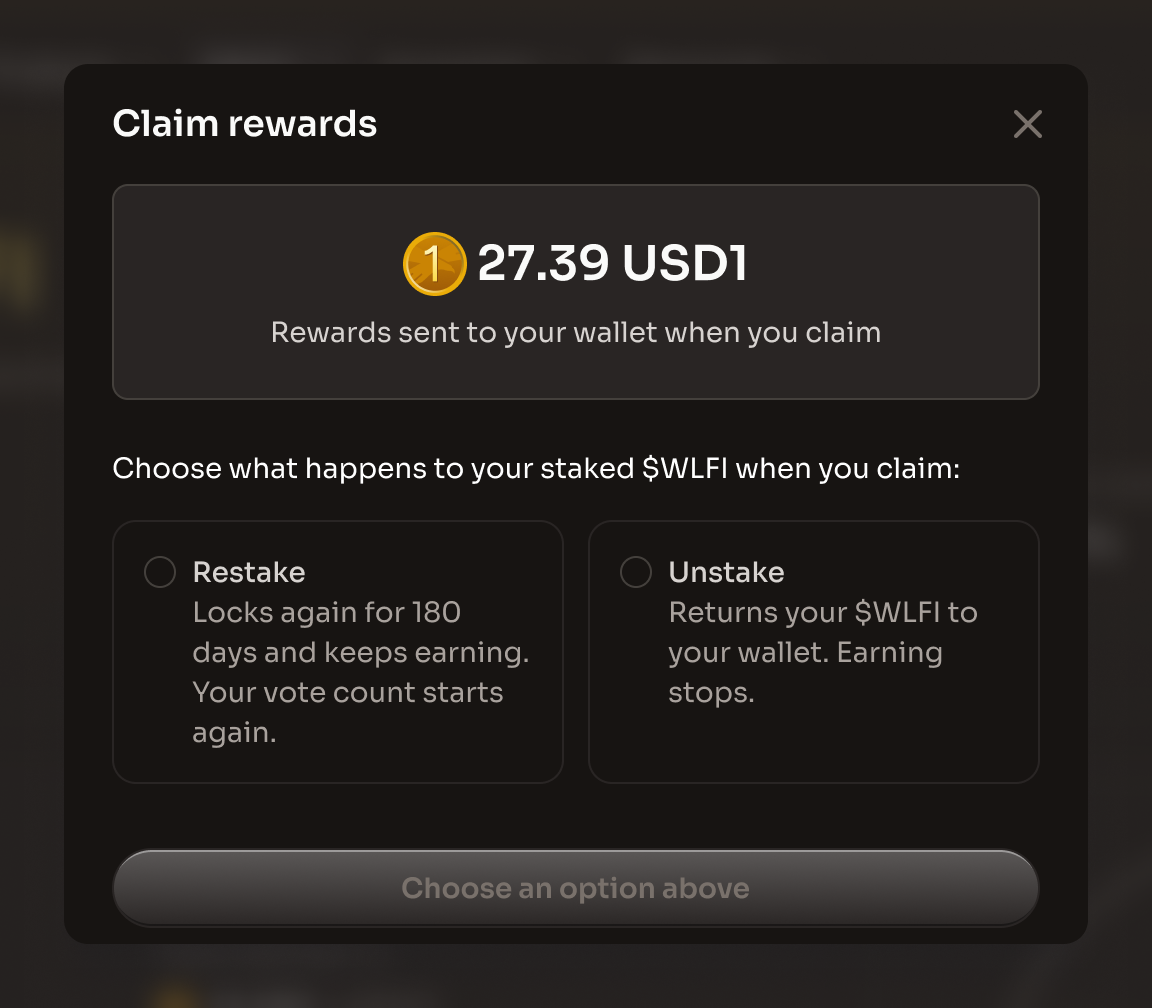
The Claim rewards dialog with the reward amount, the Restake and Unstake options, and the Choose an option above button disabled
The dialog shows the rewards that will be sent to your wallet when you claim
Step 2: Choose what happens to your $WLFI

The "Claim rewards" dialog shows the USD1 rewards your position has built up and not yet claimed, with the caption "Rewards sent to your wallet when you claim". This USD1 goes to your wallet whichever option you pick. The dialog then asks: "Choose what happens to your staked $WLFI when you claim:"

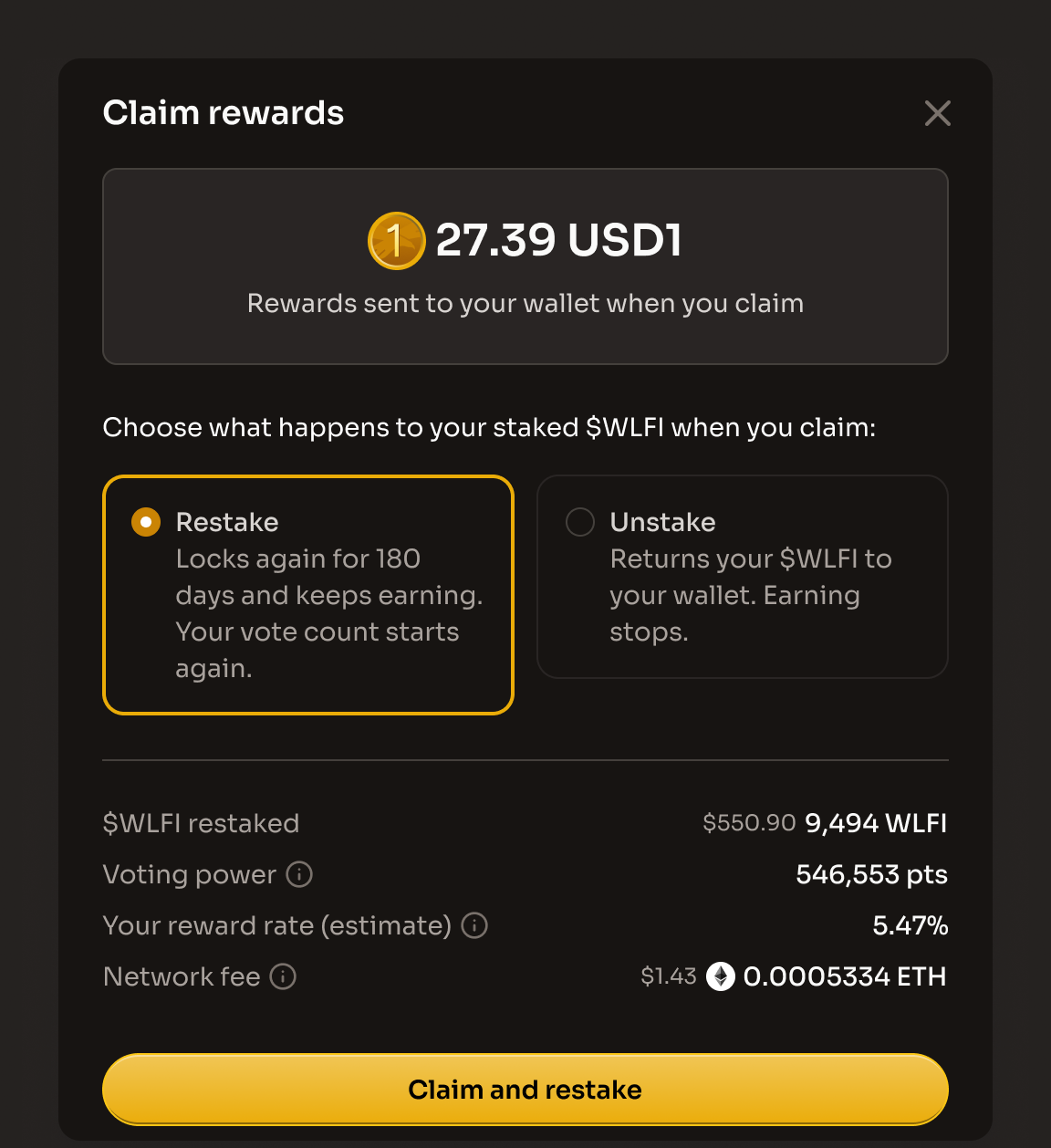
  • "Restake": "Locks again for 180 days and keeps earning. Your vote count starts again." It claims your USD1 and keeps the same $WLFI staked for another 180-day minimum, with no early exit. Your vote count starts again from zero: to claim again, you need one vote for every full 90 days of the new period (2 by day 180).

  • "Unstake": "Returns your $WLFI to your wallet. Earning stops." It claims your USD1 and returns all your staked $WLFI to your wallet. The position closes. If you stake again later, the new position starts at zero votes.

The button reads "Choose an option above" and is disabled until you pick one. Nothing is picked for you, with one exception: while staking is paused, the dialog shows a "Staking paused" notice, Restake is disabled and Unstake is picked for you. Once you pick, the button reads "Claim and restake" or "Claim and unstake".

The Claim rewards dialog with Restake selected, showing the $WLFI restaked, Voting power, Your reward rate (estimate) and Network fee rows
Restake keeps your $WLFI staked for another 180-day minimum
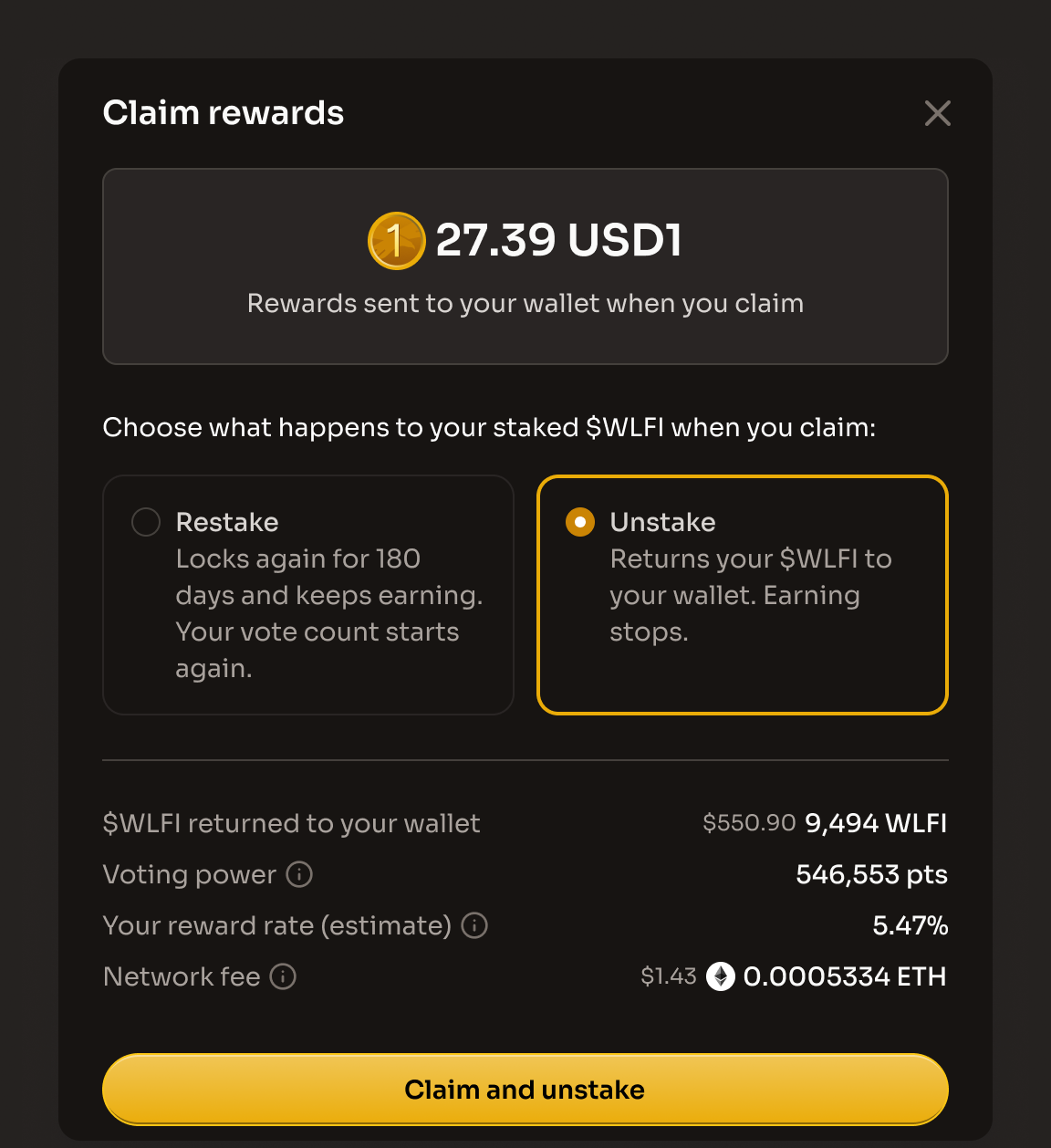
The Claim rewards dialog with Unstake selected, showing the $WLFI returned to your wallet, Voting power, Your reward rate (estimate) and Network fee rows
Unstake returns your $WLFI to your wallet with the rewards
Step 3: Review the summary

The details appear only after you choose an option:

  • With "Restake": $WLFI restaked shows all the $WLFI in your position, including anything you added, with its dollar value in grey. It does not include your USD1 rewards

  • With "Unstake": $WLFI returned to your wallet shows all the $WLFI in your position coming back to your wallet, with its dollar value in grey. It does not include your USD1 rewards

  • Voting power: "How much your vote counts on governance proposals. Restaking or unstaking does not change it." It shows your total voting power as one figure, in points (pts)

  • Your reward rate (estimated): "Rewards accrued during your current staking period, expressed as an estimated annual rate using your stake's current USD value. Future rewards are not guaranteed. Claiming remains subject to program requirements." Your reward rate reflects the current staking period. If you restake, it starts again from 0%; the displayed rate does not carry over

  • Network fee: "An estimate of the Ethereum network fee. Your wallet shows the exact amount before you confirm."

Step 4: Confirm in your wallet

Click "Claim and restake" or "Claim and unstake". The app first requests a claim authorization, which checks your votes and the state of your position. Then confirm in your wallet. While the transaction is pending, the dialog shows "Waiting for confirmation", first with "Please confirm the transaction on your wallet to continue." and then "Your transaction was sent to the Ethereum network and is waiting to be confirmed."

Step 5: Review the result

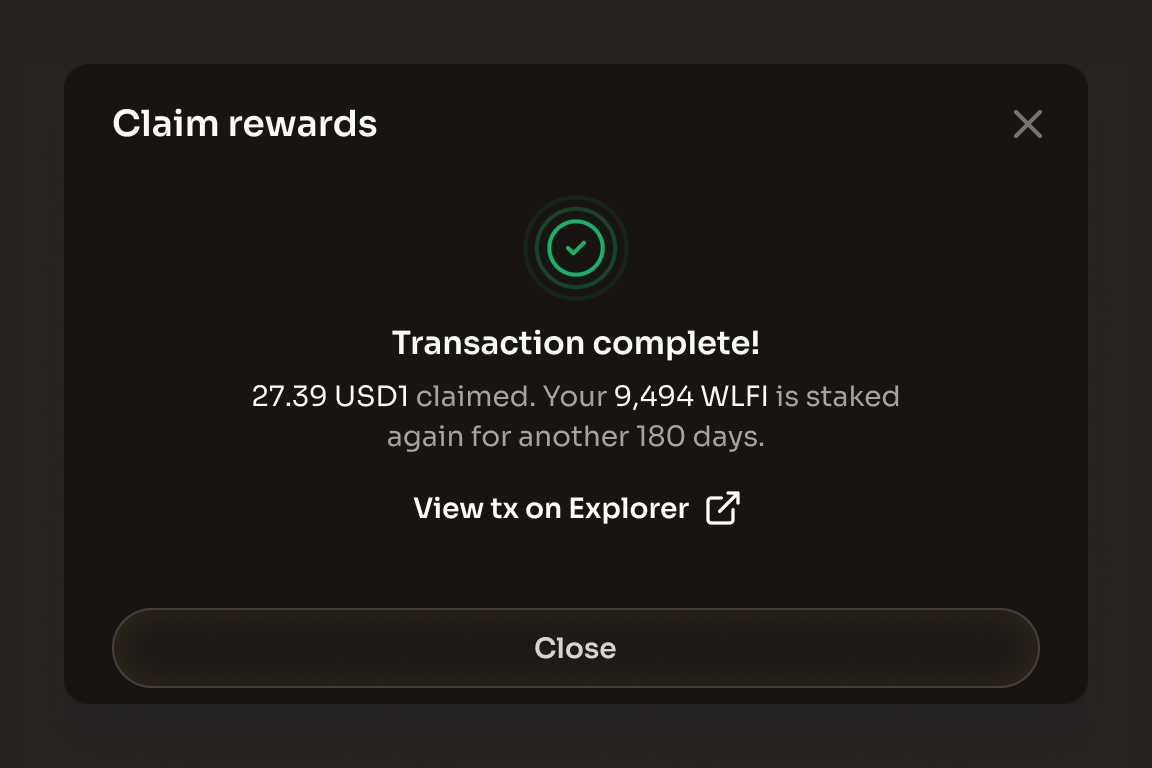
When the transaction is confirmed, the dialog shows "Transaction complete!" with a "View tx on Explorer" link and one of these messages:

  • After a restake: "[rewards] claimed. Your [amount] WLFI is staked again for another 180 days."

  • After an unstake: "[rewards] claimed and [amount] WLFI returned to your wallet."

Earned to date in the Your rewards card stays the same, because the amount you claimed only moves from unclaimed to claimed, and Total claimed goes up by the amount you just claimed. After an unstake the Your rewards card is hidden, because it shows only while a stake is open. The Activity card records a Claimed row with the USD1 you received, plus a Restaked row showing the new maturity date, or an Unstaked row with the $WLFI returned. Your total voting power does not change either way.

The Transaction complete view after a claim, showing the amount claimed and what happened to the staked $WLFI
The result shows the rewards claimed and where your $WLFI went

Rewards are paid in USD1 from one shared rewards pool to the wallet that holds the position. Restaking does not convert rewards into $WLFI.

What's next?

Additional resources

Last updated