> For the complete documentation index, see [llms.txt](https://docs.worldlibertyfinancial.com/llms.txt). Markdown versions of documentation pages are available by appending `.md` to page URLs; this page is available as [Markdown](https://docs.worldlibertyfinancial.com/wlfi-token/stake-wlfi/add-to-stake.md).
# Add to your stake
You can add unlocked $WLFI to an open position before it matures. Once your 180-day minimum has passed, the position cannot be added to; claim your rewards and restake to start a new term. The added $WLFI joins the existing position and starts accruing potential rewards from the date added. It shares the original maturity date and is locked only for the remaining period. It is withdrawn or restaked together with the rest of your position. This guide shows how to add to your position and check the result.
## Prerequisites
Before you begin, ensure you have:
* An open staking position that has not yet matured
* At least 0.01 unlocked $WLFI in the same wallet
* ETH in your wallet for gas fees
## Step 1: Open the Add to stake dialog
On the staking page, click **"Add to stake"** in the staking widget. The button only appears when you have an open position that has not yet matured and your wallet holds at least 0.01 $WLFI. With less than that, the widget shows **"Vote on Snapshot"** in its place. After maturity the widget shows no **"Add to stake"** button. The **"Add to stake"** dialog opens on your current position, with the description "Add more $WLFI to your existing stake. The maturity date does not change."
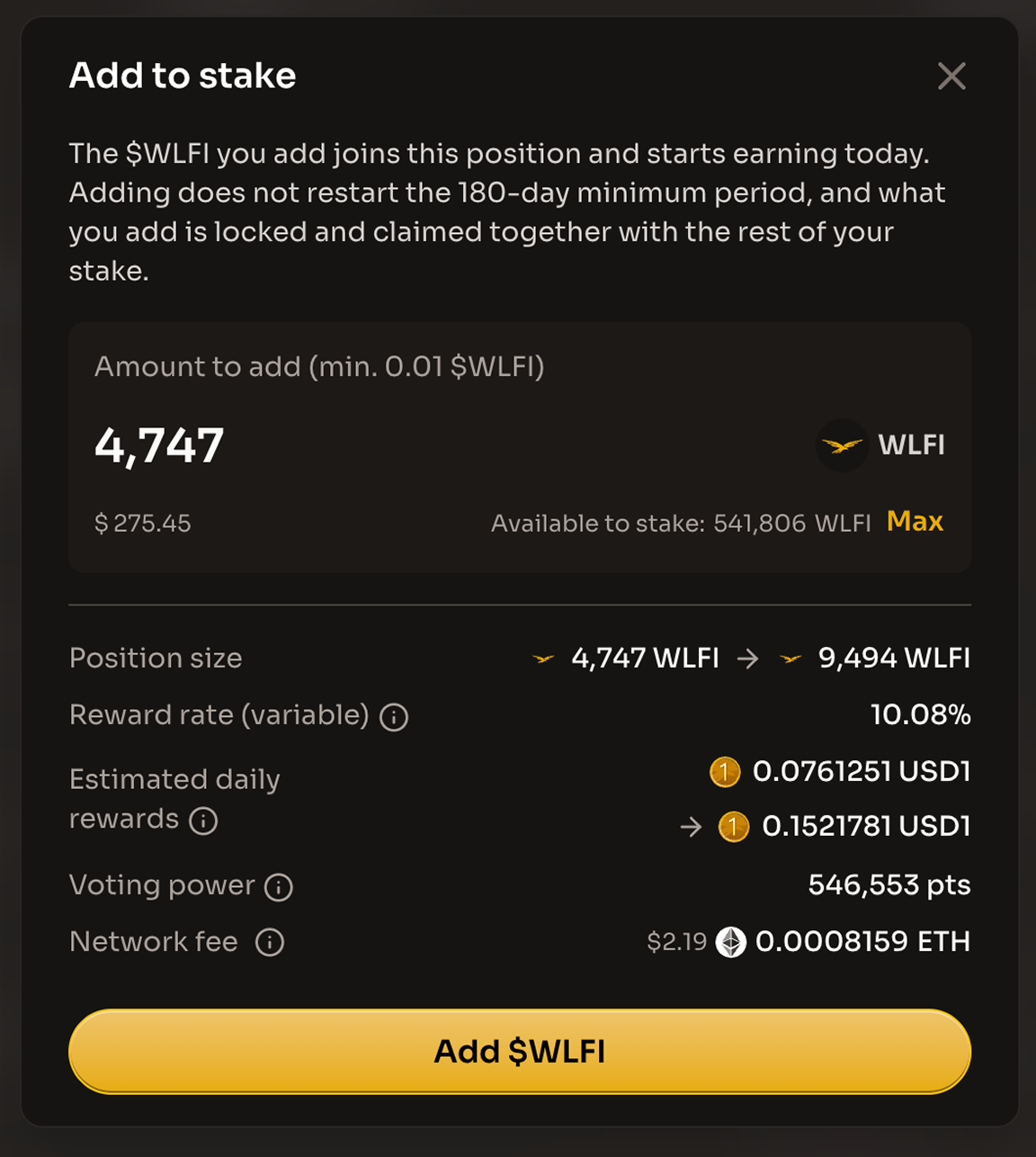
The Position size row shows your position before and after adding
## Step 2: Enter the amount
Enter the amount in the **"Amount to add (min. 0.01 $WLFI)"** field, or click **"Max"** to add everything shown as **Available to stake**. The button reads **"Enter amount"**, **"Minimum 0.01 $WLFI"** (with **"Minimum addition is 0.01 $WLFI."** under the field) or **"Insufficient balance"** until the amount is valid; when you leave the field, an amount above your balance snaps to the balance and an amount below the minimum rises to the minimum. With a valid amount, the button reads **"Add $WLFI"** and the dialog shows:
* **Position size**: how much $WLFI is in your position now, and how much it will be once this addition goes through. With **Value in: USD** selected, both figures are shown as dollar values at the current $WLFI price instead.
* **Reward rate (variable)**: "The current rate, shown as a yearly figure. It moves with the size of the pool and the total staked, so it can go up or down. Rewards are not guaranteed." It is one rate shared by every staker, so the dialog shows it once, and it does not change with the amount you enter.
* **Estimated daily rewards**: "The approximate USD1 your new total will earn each day at today's rate." It shows your position now and after this addition; the gap between them is the estimated extra per day. It is not a promise and nothing is paid daily.
* **Voting power**: "How much your vote counts on governance proposals." It shows your total voting power as one figure, in points (pts). The $WLFI you add already counts while it sits in your wallet, and it counts the same once staked, so adding does not change it.
* **Network fee**: "An estimate of the Ethereum network fee. Your wallet shows the exact amount before you confirm." If an approval is needed first, that is a separate wallet confirmation with its own fee.
If your voting power is delegated, the dialog also shows the delegation warning: **"Your voting power is delegated to \[delegate]."**, with a reminder that only votes you cast yourself count toward claiming.
If the amount is more than the staking contract is approved to move, an **"Approve WLFI to continue"** button appears first. Confirm the approval in your wallet and wait for **"Approve Confirmed"** before continuing.
{% hint style="info" %}
Adding does not restart your 180-day minimum, does not affect the votes you have already cast, and does not change how many votes you need: one for every full 90 days staked, counted on the day you claim. The **Matures on** date stays the same. Once your position has matured, it cannot be added to; the app then shows "This stake has passed its 180-day minimum, so it can't be added to. Claim and restake to add more once your votes are in."
{% endhint %}
## Step 3: Confirm the addition
Click **"Add $WLFI"** and confirm the transaction in your wallet, or click **"Cancel"** to close the dialog. While the transaction is pending, the dialog shows **"Waiting for confirmation"**, first with **"Please confirm the transaction on your wallet to continue."** and then **"Your transaction was sent to the Ethereum network and is waiting to be confirmed."** When it is confirmed, the dialog shows **"Transaction complete!"** with **"\[amount] WLFI added. It earns from today and does not change your 180-day minimum."** and a **"View tx on Explorer"** link.
## Step 4: Review the updated position
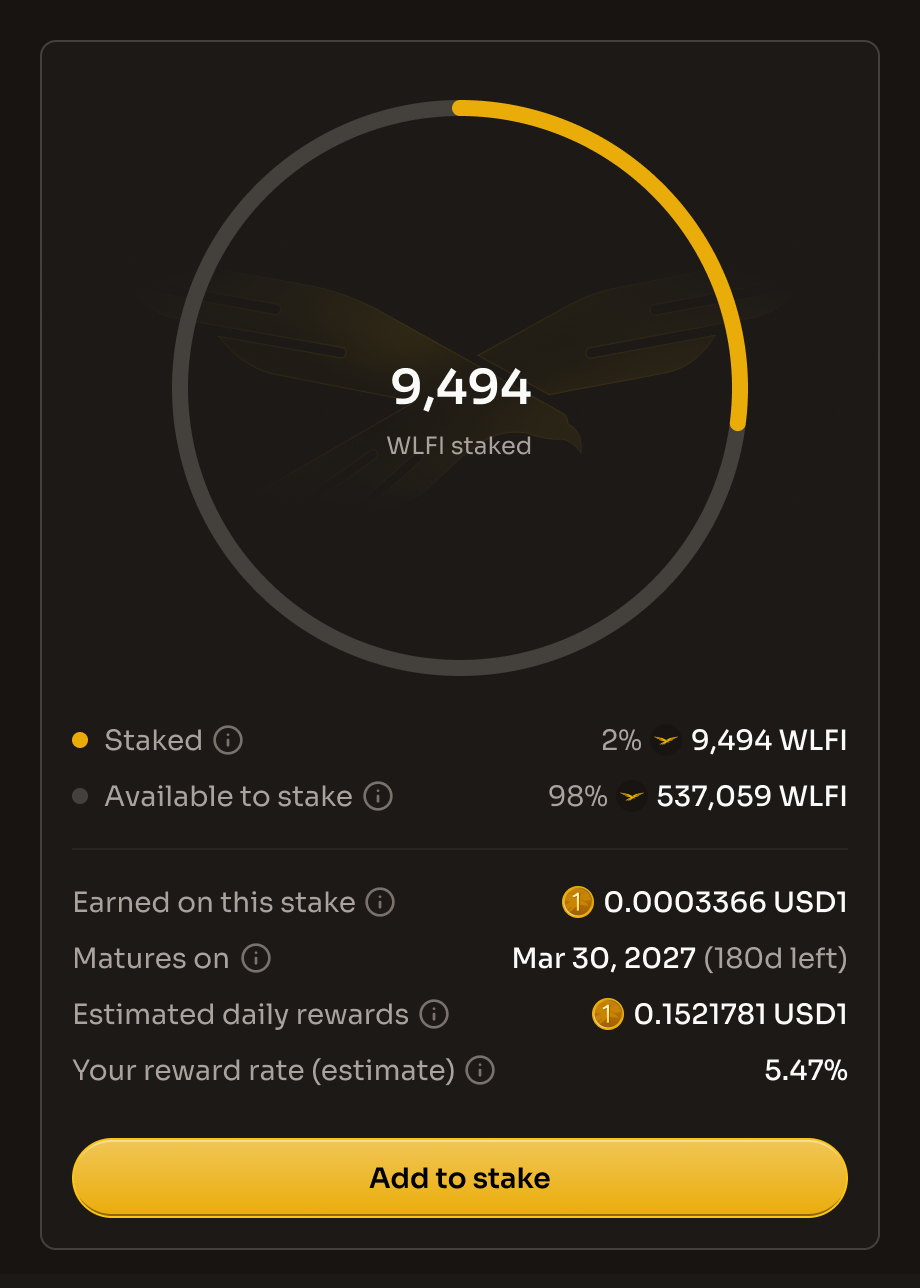
Close the dialog. The staking widget shows the new, larger amount under **Staked**, and **Estimated daily rewards** goes up to match. The **Matures on** date is unchanged, and so is your total voting power. Adding tokens can lower your displayed **Your reward rate (estimated)** because previously accrued rewards are divided by a larger stake value. This does not reduce your accrued rewards. Added tokens accrue rewards only from the date added. The **Activity** card records the addition as **"Added to stake"**, showing the amount you added and a link to the transaction.
The staked amount grows and the Matures on date stays the same.
{% hint style="success" %}
Your addition is part of your existing position and shares its original maturity date. It earns potential rewards only from the date added and is withdrawn or restaked together with the rest of your position.
{% endhint %}
## What's next?
* [**Vote to stay eligible**](/wlfi-token/stake-wlfi/vote-to-stay-eligible.md) - Keep meeting the voting requirement
* [**Claim your rewards**](/wlfi-token/stake-wlfi/claim-rewards.md) - Claim your USD1 rewards once the 180-day minimum is up and your votes are in
## Additional resources
* [Stake $WLFI overview](/wlfi-token/stake-wlfi.md)
* [Staking FAQ](/wlfi-token/stake-wlfi/faq.md)
* [Stake $WLFI](/wlfi-token/stake-wlfi/stake.md)
* [Contact Support](/resources/contact.md)
---
# Agent Instructions
This documentation is published with GitBook. GitBook is the documentation platform designed so that both humans and AI agents can read, navigate, and reason over technical content effectively. Learn more at gitbook.com.
## Querying This Documentation
If you need additional information that is not directly available in this page, you can query the documentation dynamically by asking a question.
Perform an HTTP GET request on the following URL with the `ask` and `goal` query parameters:
```
GET https://docs.worldlibertyfinancial.com/wlfi-token/stake-wlfi/add-to-stake.md?ask=&goal=
```
`ask` is the immediate question: it should be specific, self-contained, and written in natural language.
`goal` is what the user is ultimately trying to achieve, the reason they need the answer. Sharing it helps GitBook give you a better, more relevant answer. A goal is most helpful when it describes the outcome the user wants rather than restating the question. For example, with `ask=how do I create an API token`, a goal like `build a script that syncs our docs to a CMS` lets GitBook tailor the answer to that use case.
The response will contain a direct answer to the question and relevant excerpts and sources from the documentation.
Use this mechanism when the answer is not explicitly present in the current page, you need clarification or additional context, or you want to retrieve related documentation sections.